


Table of Contents
From Aqua’s Trivy to Checkmarx’s KICS to LiteLLM, and now potentially GitHub itself: the same pattern, the same root cause. Long-lived credentials sitting in trusted environments with nothing to protect them.v
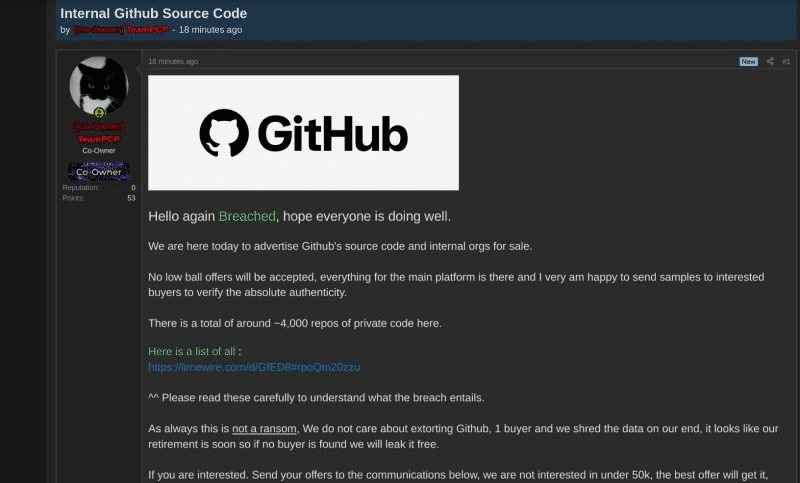
Source: https://www.linkedin.com/feed/update/urn:li:activity:7462597834907885568/
As of this morning, GitHub is investigating unauthorized access to its internal repositories after TeamPCP listed what it claims is the platform’s source code and internal organization data for sale on a cybercrime forum. GitHub stated the investigation is ongoing and that the attacker’s claim of approximately 3,800 repositories is “directionally consistent” with findings so far. The reported entry vector: a poisoned VS Code extension that compromised an employee device. GitHub says it has rotated critical secrets and found no evidence of impact to customer data outside its internal repositories.
If the claims hold, this would be the most consequential escalation in a campaign that has already compromised some of the most trusted tools in the developer ecosystem. The reported pattern is strikingly familiar: a poisoned trusted extension, credentials harvested from the environment it was running in, and lateral access to internal infrastructure. That pattern has played out at least four times already in the past two months.
Whether the target is a CI runner or a developer’s laptop, the mechanics are the same: a trusted tool with access to long-lived credentials is turned against its own environment. The entry point changes. The root cause does not.
According to Palo Alto Networks Unit 42, the group is believed to have exfiltrated data from more than 500,000 infected machines and harvested over 300 GB of credentials and secrets (citing vx-underground as the source for those figures). The first wave hit Aqua Security’s Trivy on March 19, 2026. Checkmarx’s KICS followed on March 21. LiteLLM on March 23. Telnyx on March 27. TanStack and durabletask have since been added to the list. And now, potentially, GitHub itself.
How the TeamPCP Supply Chain Attack Works
The pattern across every TeamPCP wave is the same. The attacker uses previously stolen credentials to poison a trusted tool’s release tags. Downstream CI/CD pipelines pull the poisoned version during a routine build. The payload executes before the legitimate tool logic, then harvests every long-lived credential it can find: cloud IAM keys via IMDS, secrets in /proc/<pid>/mem (bypassing GitHub Actions’ log masking), .env files, SSH keys, kubeconfig, Docker registry credentials, and publishing tokens for npm and PyPI. Those publishing tokens become the fuel for the next wave: 47 additional packages were poisoned in under 60 seconds.
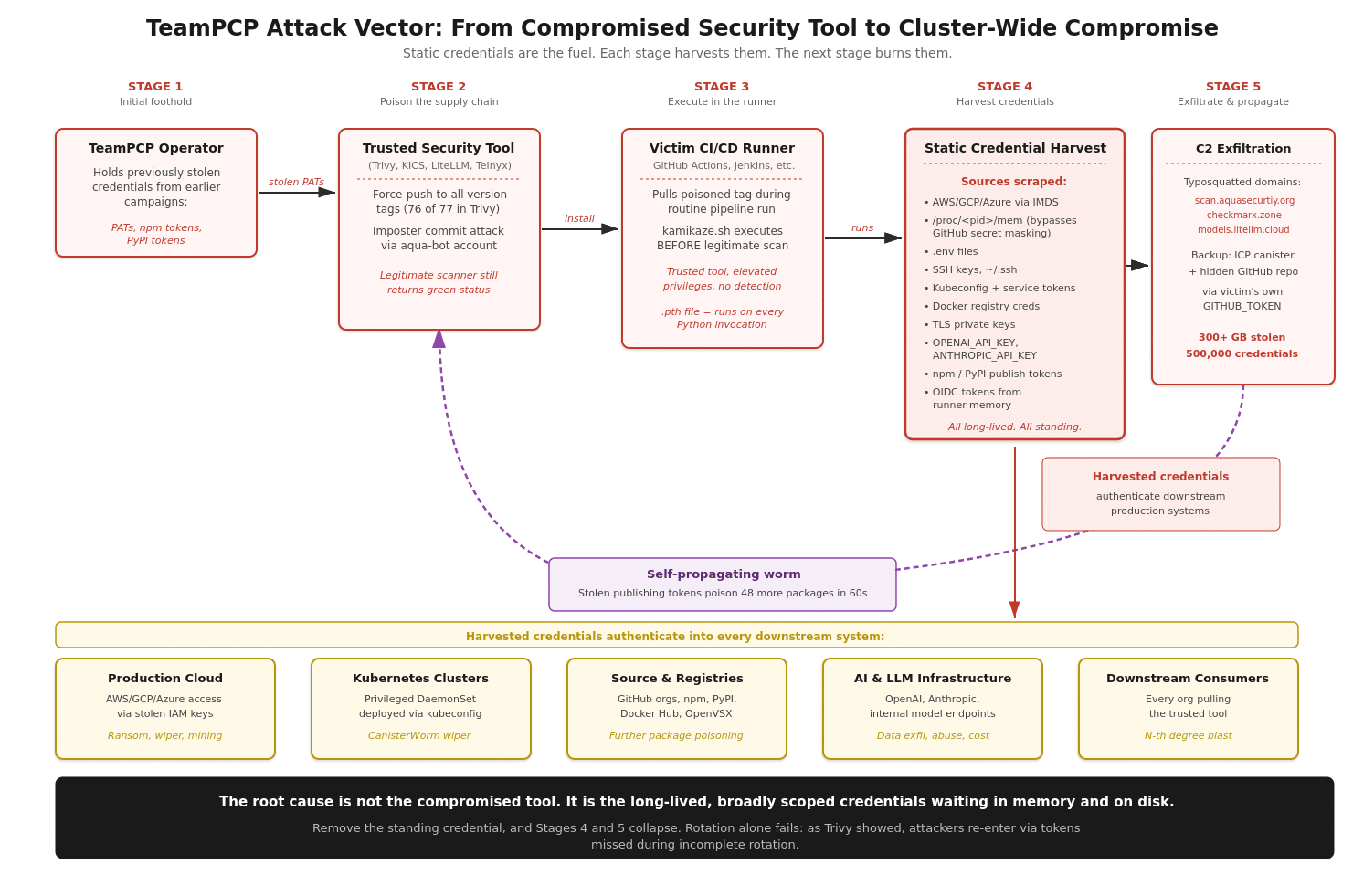
Figure 1: The TeamPCP attack vector. Each stage feeds the next using credentials harvested from the previous one.
The root cause is not the compromised tool. It is the long-lived, broadly scoped credentials sitting in every runner waiting to be harvested. Rotation does not fix this: Aqua Security rotated credentials after a February breach, but the rotation was incomplete, and TeamPCP came back weeks later. SBOM tools cannot detect a malicious version of a package whose previous release was clean. SHA pinning helps but breaks the moment a maintainer account is hijacked. The structural fix is to remove the thing being harvested.
How Hush Eliminates the Attack Surface
At Hush, we built Universal Access Management around a simple thesis: the long-lived static credential is not a security primitive. It is the vulnerability. Our platform replaces standing credentials with policy-driven, just-in-time access tied to verified workload identity, alongside a runtime sensor that sees every non-human identity in your environment.
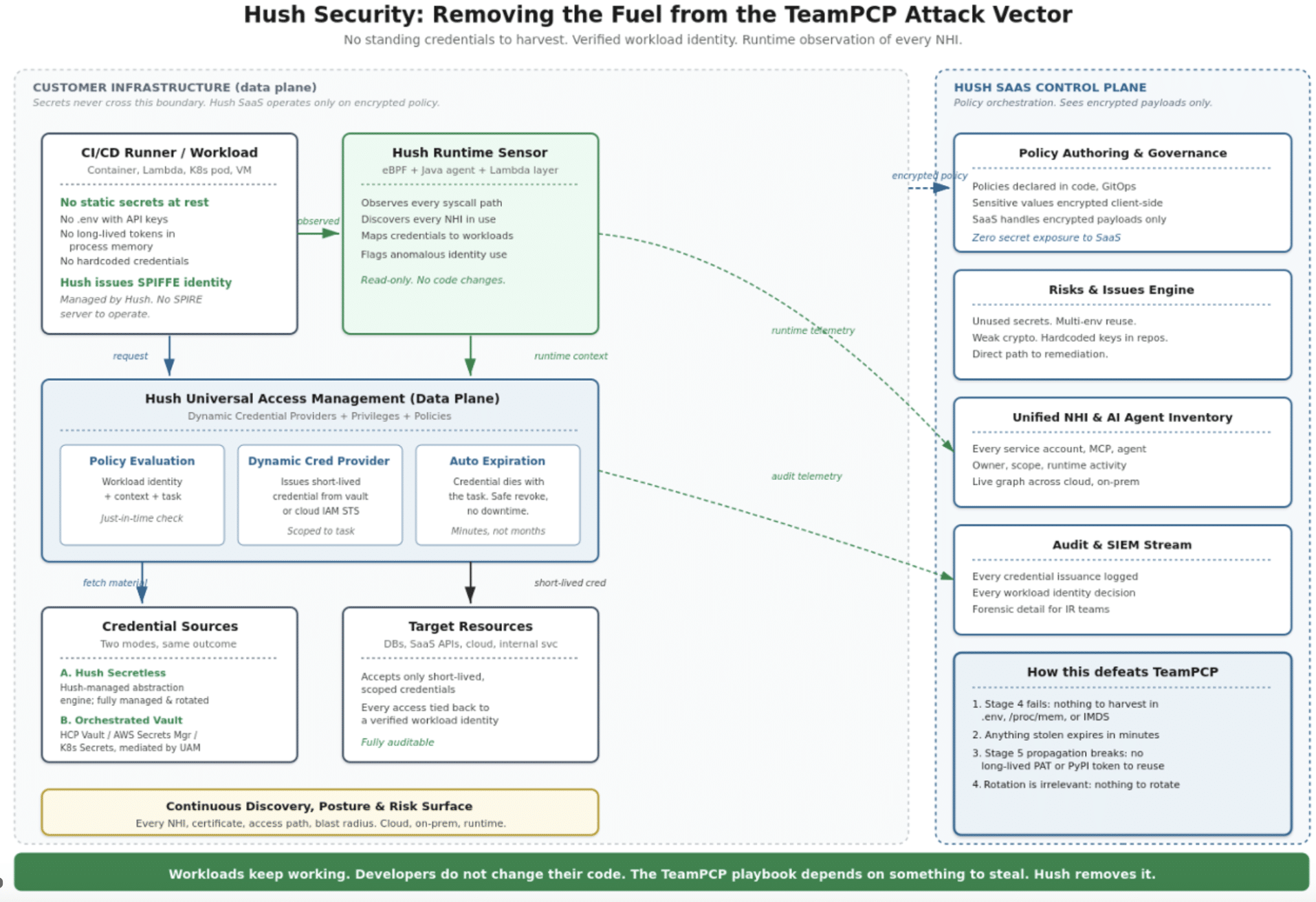
Figure 2: Hush as the structural defense against the TeamPCP attack vector.
SPIFFE identity as a service
Hush issues each workload a cryptographically signed SPIFFE ID, derived from attributes like its Kubernetes namespace, service account, node identity, and container image. You do not stand up your own SPIRE server. When the workload needs access to a resource, Hush evaluates a policy in real time and a Dynamic Credential Provider mints a short-lived credential scoped to the task at hand. The credential is generated only when access is actively requested. The task completes. The credential expires.
Two paths: fully secretless, or Hush-orchestrated Vault
For workloads you are ready to convert, Hush operates as a Secretless Access Management Platform: credentials originate from Hush’s internal secret abstraction engine, fully managed and rotated. For everything else, Hush orchestrates your existing secret backends (HashiCorp Vault, AWS Secrets Manager, Kubernetes Secrets) via policies tied to verified SPIFFE identity. Either way, the workload no longer holds a long-lived static credential at rest, and the SaaS control plane never sees secret material.
Runtime observation of every non-human identity
Hush deploys an eBPF-based sensor (with a Java agent for JVM workloads and a Lambda layer for serverless) that watches every non-human identity in flight. It sees which workload reads which credential from which location. It flags identity behavior in real time, regardless of whether the binary is signed, trusted, and called “Trivy”. Static scanning cannot find malicious behavior in trusted binaries. Runtime observation can.
TeamPCP Against a Hush-Protected Pipeline
Here is what happens when the same attack hits a Hush-protected environment.
What the payload attempts at each step, and what Hush does about it.
Step 1 — Poisoned Trivy action scrapes for secrets Payload: Attacker injects malicious code into the legitimate scan. The payload escalates scanner privileges and sweeps the runner for credentials — .env files, .npmrc, .dockerconfig, kubeconfig, and any backup or config files that typically hold long-lived API keys or service tokens.
→Hush response: No secrets stored on disk. Credentials are never written to the filesystem. Cloud access is mediated by the Hush Dynamic Credential Provider — credentials are issued on demand, only when a workload is actively making a request. The scan finds nothing to take.
Step 2 — Searches for publishing tokens to propagate Payload: Payload looks for npm tokens, PyPI publishing tokens, and GitHub PATs to infect downstream packages and trigger Stage 2 worm propagation.
→Hush response: No publishing tokens. Stage 2 cannot start. Long-lived tokens do not exist in the runner. The self-propagating worm loop is cut. Nothing to harvest, nothing to push.
Bottom line: The build ships. The legitimate scan completes. Your team has nothing to rotate, because nothing was exposed.
The payload finds no credentials, no secrets on disk, and no publishing tokens in the runner. The one short-lived token it extracts from process memory expires before TeamPCP’s C2 can use it. Stage 5 propagation cannot start. The build ships. Your team has nothing to rotate.
What to Do Now
Practical guidance for security practitioners:
- Audit every long-lived GitHub PAT, PyPI token, and npm token in your organization. Shorten lifetimes or replace with OIDC.
- Pin third-party GitHub Actions to commit SHAs, not version tags.
- Restrict outbound network egress from CI runners.
- Verify that any past credential rotation was actually complete.
- Inventory your non-human identities: how many exist, who owns them, and what they can reach.
- Add runtime observability for NHIs. SBOM tools and static scanners will not tell you about behavior.
The static credential was a primitive that made sense for a different era of computing. The TeamPCP campaign is what it looks like when that era ends.
See how Hush protects your environment
If you want to see how this looks in your own environment, my team is happy to walk through it. Request a demo at hush.security/demo. or start for FREE
The TeamPCP playbook depends on something to steal. Let’s stop leaving it lying around.