


Table of Contents
What to do when the MCP server your workforce depends on has no concept of users.
I’ve run into this more than once. A hundred developers need their agents to reach an MCP server that doesn’t support OAuth. The server authenticates with one service-account key, so the key is handed to all hundred.
Then someone left the company.
Rotating the key locks out that person. It also locks out the other ninety-nine, until each one updates a config file. So the key doesn’t get rotated, and a former employee keeps working access.
That’s the problem. The rest of this is why it shows up now, and what closes it.
Service-account keys are old. Handing one to a hundred people is not.
Before agents, a credential like this went to a handful of integrations built by a platform team. The number of copies tracked the number of integrations.
Now the caller is an agent, and it runs in each developer’s own environment. A credential has to be wherever the agent runs, so the number of copies tracks headcount.
Storage got worse at the same time. A CI secret lives in a secret store. An agent credential lives in a config file on a laptop – synced, screenshared, occasionally committed.
And the credential is now readable by the agent. A prompt injection arriving in a tool result is an adversary who can write text into the process holding the key. CI secrets were never exposed that way.
The admin had two options
- Distribute the key. The usual outcome. Fast, and unrecoverable. You can’t take it back from a hundred laptops, and you can’t revoke one person.
- Refuse. Doesn’t stop the work. Developers run the MCP server locally with a key they obtained themselves. One credential the admin knows about becomes an unknown number they don’t.
Notice what isn’t on the list: the option where one person loses access and nobody else notices.
There is a third option
Put something between the agents and the server. Not something you write – a gateway you deploy. Every MCP call, from every agent, goes through one place.
The gateway authenticates the person first. The agent presents a token identifying the user, not the resource.
From there it does what you’d expect. It decides which applications that person may reach and which tools they may call, gates the sensitive ones behind consent, and records every call against a name.
All of that happens before it talks to the resource at all.
For servers that speak OAuth, the loop closes
Each user connects once. The gateway holds their token. Calls carry their identity, and revoking one person is one action that affects one person.
This is why governance for agent access converged on OAuth. The model assumes the resource speaks it.
The assumption fails in two places, for the same reason:
- SaaS MCP servers that authenticate with a static API key instead of implementing OAuth.
- Internal MCP servers that bridge to an internal API. Usually worse: the bridge was written for one trusted caller, so its credential tends to be broad – a service account, an admin token, a connection string.
Some SaaS vendors will add OAuth in time. Internal bridges mostly won’t – few teams will build identity-provider integration into something whose job is to wrap an API. Either way, the timeline isn’t yours.
Let the gateway hold the key
Hush Gateway is that third option. Agents connect to it instead of to each server; every call is authorized against the person behind it and recorded under their name.
That holds whether or not the server speaks OAuth. The resource stops dictating your access model.
The gateway verifies a person either way, then presents a credential it holds on their behalf. Where the server speaks OAuth, that is the person’s own access token; where it doesn’t, it is the application’s own credential – a bearer token, a basic pair, or a value in a named header.
The credential is stored as a managed secret, encrypted per deployment, and decrypted only inside the gateway. It never reaches the agent, which carries only its Hush token. Access is decided before the credential is used: a user who isn’t entitled to the application is refused before any upstream request is made.
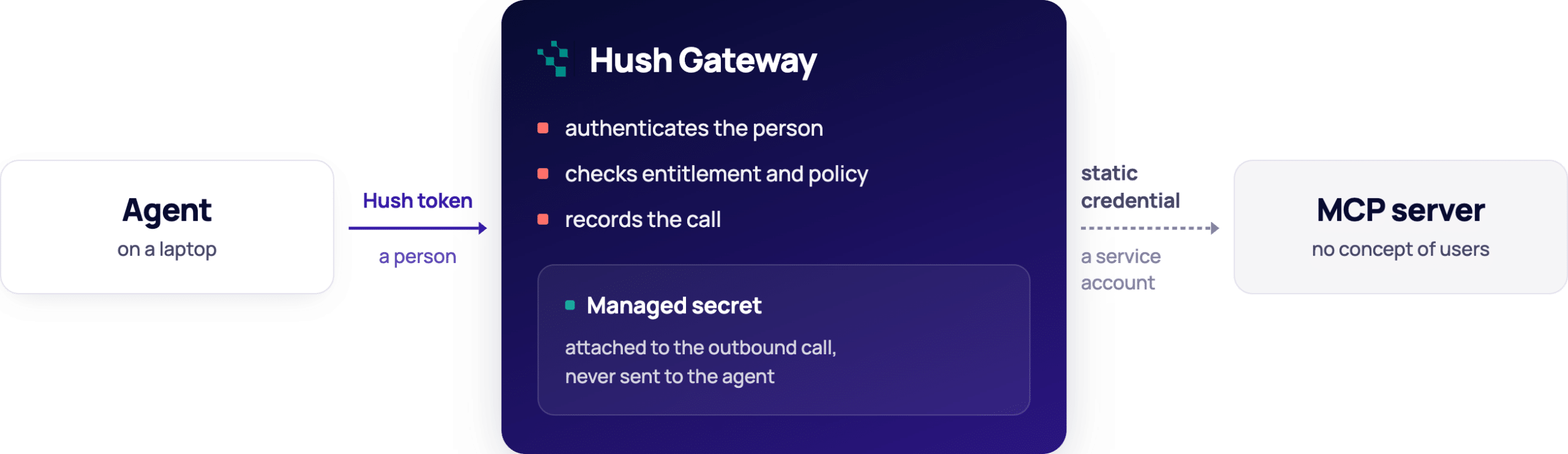
For a server with no OAuth to offer: identity arrives with the call and stops at the gateway. What continues upstream is a credential the resource shares across everyone.
What changes
- Onboarding. Configure the credential once. Entitled users work immediately.
- Offboarding. Remove one person’s entitlement. Their access stops. The key is untouched, and the other ninety-nine never notice.
- Requests. An unentitled user’s agent is told to ask, and can raise an access request for review. No ticket.
- Audit. Every call is recorded against a person, not a service account.
The credential still has no concept of users. The gateway supplies one.
Where the journey continues
The gateway decides whether a call happens and which tool runs. What a tool reaches once it runs is up to the tool.
The difference shows in the tool surface. A bridge exposing run_query(sql) hands an entitled user everything the service account can read. The gateway can allow that tool or block it, but it cannot tell one query from another.
A bridge exposing get_invoice(id) and list_open_invoices() is governable: allow one, block the other, put consent in front of the ones that write.
Neither gives you per-record authority – that still belongs to the resource. But the tool surface decides how much of the gap the gateway can cover, which is worth knowing before you write an internal bridge. Getting that authority down to the resource itself is the next step, and a harder one.
About Hush Identity Gateway
Hush Gateway is a single control point for everything your agents reach: MCP servers that speak OAuth, servers that don’t, and databases. Adding an application is configuration rather than a project, and enrolling a new agent or person takes minutes. Entitlement, tool policy, consent, guardrails and audit sit in one place and apply the same way to all of them. Available self-hosted or managed.