


Table of Contents
Last week, a malicious package sat on PyPI for less than an hour. It was pulled in by millions of projects as a transitive dependency. It silently harvested every secret on every machine that installed it, encrypted the haul with a hardcoded RSA key, and shipped it to an attacker-controlled server. Then it tried to pivot into Kubernetes, plant a persistent backdoor, and spread across every node in the cluster.
The package was litellm 1.82.8. The attacker didn’t compromise a cloud provider or exploit a zero-day. They uploaded a Python package. That was enough.
We want to walk through exactly how this worked, why the standard toolkit failed to stop it, and what a different security model looks like in practice.
How the attack worked
The compromised litellm 1.82.8 release (and 1.82.7, which was also affected) included a file called litellm_init.pth. Python’s site module processes .pth files automatically on every interpreter startup, before any application code runs, with no import statement required. Dropping a .pth file into a package is one of the most reliable code execution primitives available to a PyPI attacker: silent, automatic, and almost never audited.
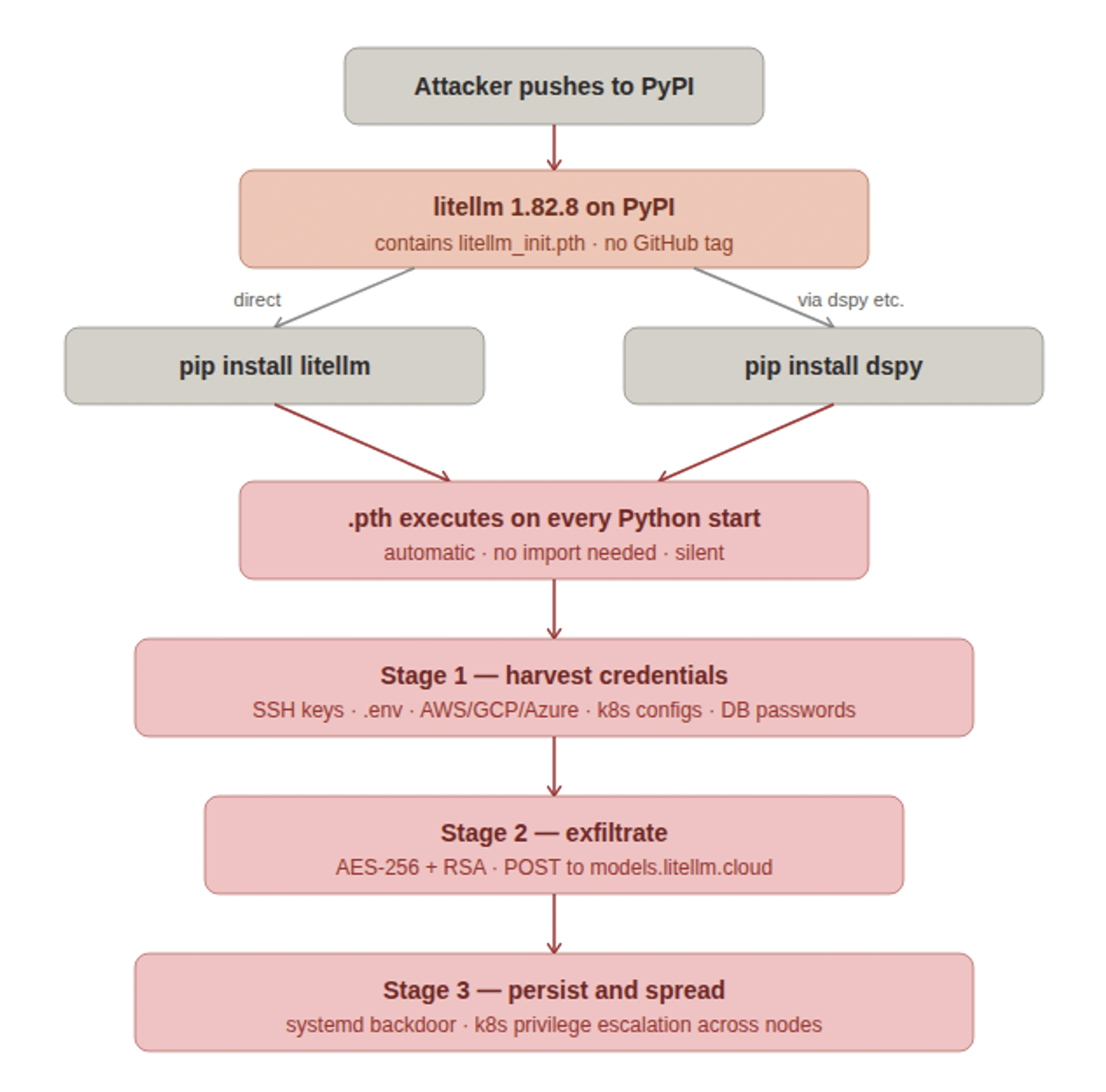
Figure 1: The three-stage attack chain, from PyPI upload through direct and transitive installs to credential harvest, exfiltration, and Kubernetes persistence.
The payload ran in three stages:
Stage 1: Harvest. A Python script crawled the filesystem for everything a cloud attacker would want: SSH private keys and config files, .env files, cloud provider credentials ( ~/.aws/credentials, GCP Application Default Credentials at ~/.config/gcloud/, Azure CLI tokens at ~/.azure/), Kubernetes configs at ~/.kube/config, .gitconfig, shell history, and anything matching common secret filename patterns. It also hit cloud metadata endpoints directly: the AWS IMDS at http://169.254.169.254, GCP metadata at http://metadata.google.internal, and container credential endpoints, to capture ephemeral tokens that would never appear on disk.
Stage 2: Exfiltrate. The collected data was encrypted with a random AES-256-CBC session key. That session key was then wrapped with a hardcoded 4096-bit RSA public key, bundled into a tar archive, and POSTed to https://models.litellm.cloud/, a domain crafted to pass a casual glance as legitimate litellm infrastructure. Only the attacker held the RSA private key, so the payload was unreadable in transit to anyone else.
Stage 3: Persist and spread. If a Kubernetes service account token existed at /var/run/secrets/kubernetes.io/serviceaccount/token, the malware used the Kubernetes API to enumerate and exfiltrate all cluster secrets across all namespaces, then attempted to schedule a privileged alpine:latest pod on every node in kube-system. Each pod mounted the host filesystem at /host and wrote a persistent backdoor to ~/.config/sysmon/sysmon.py, registered as a systemd user service at ~/.config/systemd/user/sysmon.service. The same persistence routine ran on the local machine regardless of whether Kubernetes was present.
The blast radius extended far beyond anyone who explicitly ran pip install litellm. Any package declaring litellm>=1.64.0 as a dependency pulled in the compromised version automatically, including widely used AI frameworks. LiteLLM sees roughly 97 million monthly PyPI downloads. Most victims would have had no idea they were affected.
The attack was discovered by accident. The .pth launcher spawned a child Python process via subprocess.Popen. Because .pth files execute on every interpreter startup, that child immediately triggered the same .pth again, producing an exponential fork bomb. A developer at FutureSearch noticed their machine running out of RAM after an MCP plugin pulled in litellm 1.82.8 as a transitive dependency inside Cursor. A competent attacker would not have made that mistake. The window of exposure would have been measured in days or weeks, not hours.
Why your existing tools would not have caught this
Before getting to what Hush does, it is worth being specific about why the standard security stack fails against this class of attack.
Software composition analysis (SCA) and dependency scanning check known vulnerability databases. This was not a vulnerability. The package was legitimate code doing exactly what it claimed. No CVE was ever filed. An SCA scanner pointed at your lockfile after the fact would have found nothing.
Secret scanning looks for secrets committed to source control or present in CI logs. The secrets in this attack lived on developer workstations and in running service environments, not in git. Secret scanning would not have seen them.
Network egress controls might have caught the exfiltration POST to models.litellm.cloud, if you had strict allowlisting in place. Most environments do not. Developer laptops almost never do. And the domain was designed to blend in.
Vault and secrets management tools like HashiCorp Vault or AWS Secrets Manager reduce secret sprawl when used correctly, but they still issue secrets that land somewhere: in environment variables, in files, in memory accessible to any process running as the same user. A malicious package running in the same process space or as the same OS user can reach them.
The uncomfortable truth is that all of these controls are perimeter defenses. They assume the code running on your machines is trustworthy. Supply chain attacks invalidate that assumption at the root.
The structural problem: secrets are just files
It is tempting to frame yesterday’s attack as a PyPI moderation failure, or a litellm maintainer incident. Both of those things are true and worth fixing. But they do not explain why the attack was so effective or why rotating credentials after the fact is the best available response.
Every credential that was exfiltrated (AWS access keys, GCP ADC tokens, Kubernetes configs, SSH keys, .env API keys) shared one property: it was a long-lived, static secret sitting on disk. Secrets do not authenticate their reader. They do not know whether the process opening ~/.aws/credentials is your application or malware that arrived as a transitive dependency of a package you installed this morning. Possession is the entire security model.
Supply chain attacks are designed to exploit exactly this. A malicious package runs inside your trust boundary with the same filesystem permissions as the developer who installed it. It does not need to escalate privileges or bypass endpoint controls. It just needs to read files, which any process can do.
Telling developers to rotate secrets more frequently, use a vault, or avoid hardcoding does not change this. As long as access to a resource is gated by possession of a file, any code that can read files can compromise it. The rotation cadence just determines how long the window stays open after a theft.
What a different model looks like
At Hush, we build on a different premise: the credential should never exist on the machine in the first place. Access should be granted based on verified identity and evaluated policy, not on possession of a secret.
Here is what that means concretely for this attack:
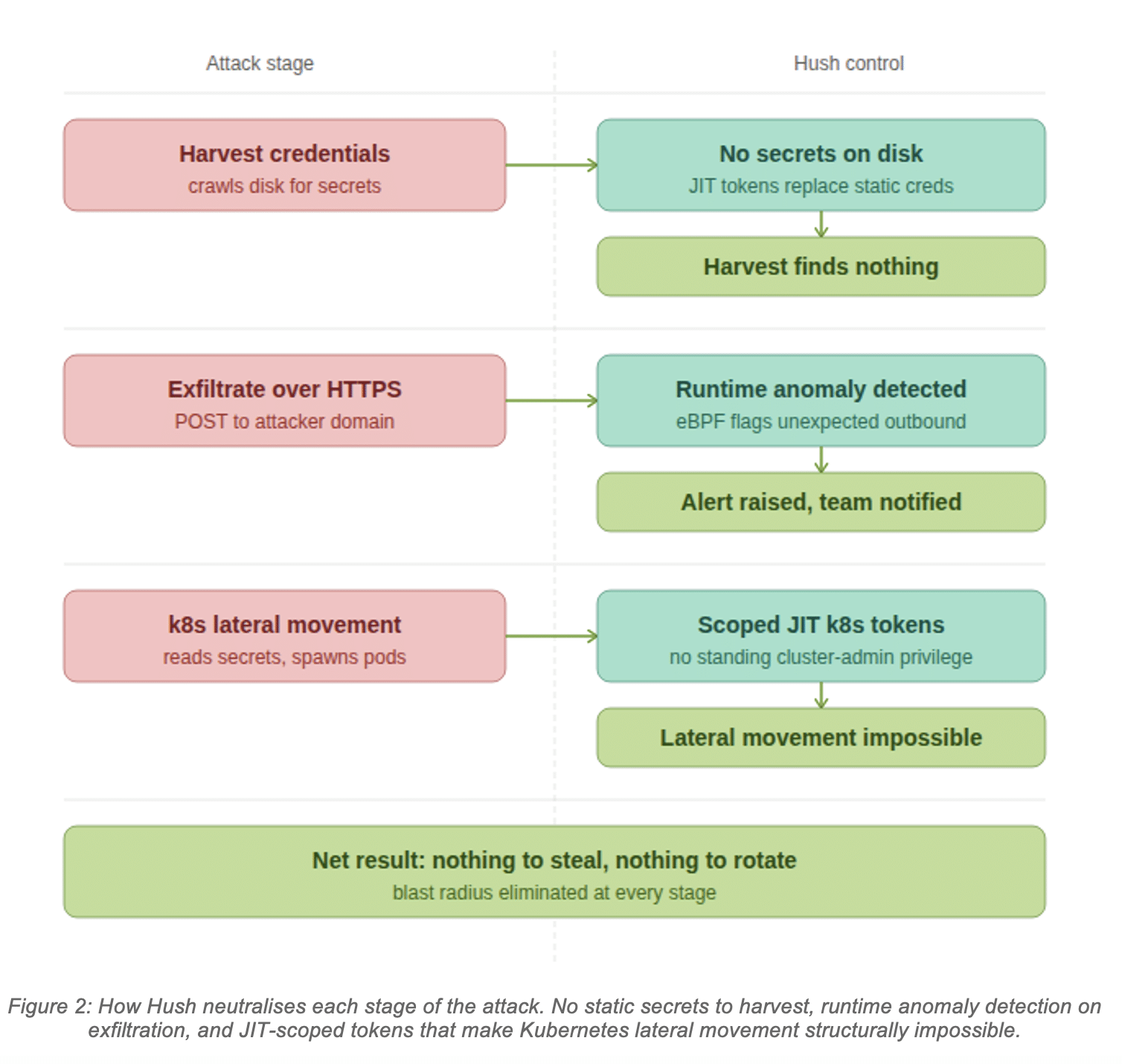
Figure 2: How Hush neutralises each stage of the attack. No static secrets to harvest, runtime anomaly detection on exfiltration, and JIT-scoped tokens that make Kubernetes lateral movement structurally impossible.
No static secrets means the harvest finds nothing. When services access AWS, GCP, Azure, databases, or APIs through Hush, they receive short-lived, dynamically issued tokens scoped to exactly the permissions the current workload requires. There is no ~/.aws/credentials. No .env file full of API keys. No Kubernetes Secret holding a database password. A malicious package doing a filesystem crawl returns empty-handed, because the material it is looking for does not exist in that form.
Runtime monitoring surfaces the exfiltration attempt. Hush’s runtime sensor uses eBPF to observe system calls without kernel modification or agent overhead. It tracks which processes open which files, which network connections they initiate, and which identities are behind each action. In the litellm scenario, the sensor would have observed: a Python child process (spawned from a .pth handler) opening credential-shaped files across multiple directories, followed immediately by an outbound TLS connection to models.litellm.cloud from a non-human identity with no policy permitting that destination. That sequence generates an alert with full process ancestry, file access trace, and network destination before the POST completes. The security team sees exactly what happened and which workloads were affected, without waiting for a crash report.
Scoped JIT tokens contain lateral movement. Kubernetes service account tokens issued through Hush are scoped to the minimum permissions the workload needs and expire after a short TTL. A token that allows a pod to read its own namespace’s ConfigMaps cannot be used to list secrets across all namespaces or schedule pods in kube-system. The lateral movement stage of this attack requires a cluster-admin-level or broadly scoped service account token to exist as a long-lived credential. With Hush, that token does not exist. The API calls the malware makes return 403, and the attempt is logged.
There is nothing to rotate after the fact. Incident response after a supply chain compromise normally means identifying every secret that was present on every affected machine and rotating all of them across every system that accepted them. That is an enormous operational exercise, it is time-pressured, and it is still reactive: you are closing a window after the theft. With Hush, the tokens that were present when the malware ran were already scoped and short-lived. They expired on their own. The cleanup conversation is about reviewing the runtime alert and confirming no persistent backdoor was installed, not about tracking down which of your 300 service credentials may have been copied.
If you were affected yesterday
If you installed or upgraded litellm on March 24, 2026, treat any machine that ran it as compromised. The immediate steps:
- Confirm the version: run pip show litellm and check for 1.82.7 or 1.82.8 in all environments, virtual environments, and uv caches (find
~/.cache/uv -name "litellm_init.pth") - Check for persistence: look for
~/.config/sysmon/sysmon.pyand~/.config/systemd/user/sysmon.serviceon affected machines - Audit Kubernetes: check kube-system for pods matching node-setup-* and review audit logs for secret enumeration across namespaces
- Rotate all credentials that were present: SSH keys, AWS/GCP/Azure credentials, Kubernetes configs, database passwords, and any API keys in .env files or environment variables
Rotation is necessary. It is also a good moment to ask how many of those secrets needed to be long-lived in the first place, and how many machines they were distributed across. That count is your structural exposure.
The question this attack puts to every engineering team is not “were we hit?” It is “what would our posture look like if a package like this ran on our machines for a week without crashing anything?” If the answer involves rotating hundreds of secrets across dozens of systems after the fact, the architecture itself is the risk.
We built Hush to make that question less frightening. If you want to see what eliminating static secrets looks like for your stack, we are happy to walk through it.
Hush Security delivers a unified access and governance platform for AI and non-human identities, replacing secrets with verified identities and dynamic, just-in-time access policies.