
Table of Contents
Three services crashed at 3 AM. The rotation job failed. Your team got paged. Six hours later, you had a working incident report.
Meanwhile, your data pipeline agent extracted customer data for hours before anyone noticed. Your logs show the agent made the queries. You can’t prove it wasn’t an attacker.
Both scenarios share the same root cause: you’re managing credentials like it’s 1995.
Compromised identities account for over 70% of cloud breaches. Stolen credentials are tied to 86% of security breaches. Your API key costs $10 on the criminal market.
You’re not managing credentials. You’re managing a liability.
The Operational Tax of Manual Credential Lifecycle Management
Every 90 days, your team stops shipping features to rotate credentials. Someone writes a rotation job. Someone schedules the maintenance window. Someone stays up late monitoring failures. Someone gets paged when it breaks.
For microservices, rotation failures cascade. For AI agents, they run 24/7 without human intervention – rotate too slow and the agent crashes, rotate too fast and you cause outages.
When credentials leak:
- Your API key works for 6 months
- The attacker has unlimited access to everything it touches
- You won’t notice for ~88 days
- Breaches caused by compromised credentials cost $4.50M on average
- The credential itself cost an attacker $10
Your infrastructure is secured by a $10 secret that lives forever.
What SPIFFE Actually Is
SPIFFE = Secure Production Identity Framework For Everyone.
Instead of: “Here’s a secret, rotate it every 90 days.”
SPIFFE says: “I’ll issue you a certificate valid for 1 hour. When it expires, you get a new one automatically. No pre-shared secrets. No rotation jobs.”
Three building blocks:
SPIFFE ID – a unique URI identifying the workload, e.g. spiffe://example.org/ns/production/sa/payment-service. Public identifier, not a secret.
SVID (SPIFFE Verifiable Identity Document) – the credential itself. X.509 cert or JWT. Short-lived. Auto-rotates. Delivered via local API – no manual distribution.
Attestation – cryptographic proof of identity derived from environmental signals (Kubernetes node identity, cloud metadata, container runtime). No pre-shared secrets.
How it works: Workload starts, requests identity, SPIRE server verifies environment, issues a 1-hour certificate, workload uses it, new one issued before expiry.
What SPIFFE Promises
No rotation windows. Certificates rotate hourly. Zero downtime. Zero 3 AM pages.
Breach window shrinks to 60 minutes. If a credential leaks, it’s invalid in an hour – not six months.
No credential distribution. No mounted secrets, no shared API keys – workloads prove identity cryptographically.
Mutual authentication. Service A proves identity to Service B. Both sides verified.
Fine-grained, scoped access. Payment service gets access to the payments DB only. Nothing else.
Scales without operational burden. Your 150th microservice doesn’t need a new rotation job. Same system, zero overhead.
This is the pitch – and it’s a good one. SPIFFE has been the “right answer” for workload identity for nearly a decade.
So why isn’t everyone using it?
The Reason SPIFFE Stalled: The Ecosystem Doesn’t Speak It
Here’s the uncomfortable truth almost no SPIFFE content will tell you: SPIFFE only works where both sides of the conversation support it.
And most of the things your workloads actually talk to – don’t.
- S3 doesn’t accept SPIFFE SVIDs. It accepts AWS access keys or STS tokens.
- Snowflake, Postgres, MySQL, MongoDB Atlas – none authenticate SPIFFE identities natively.
- Stripe, Twilio, OpenAI, Salesforce, GitHub, Datadog, every SaaS API your stack depends on – they want an API key or OAuth token. Not an SVID.
- Your legacy internal services – the ones written before 2021 – still expect a bearer token or a username/password.
SPIFFE handles east-west traffic beautifully: service-to-service mTLS inside a mesh. But the moment a workload needs to read an S3 bucket, query Snowflake, call Stripe, or hit any of the hundreds of APIs your business runs on – you’re back to static API keys. Back to vaults. Back to 90-day rotation jobs. Back to the $10 forever-credential problem.
This is why most SPIFFE rollouts die mid-implementation. Teams deploy SPIRE, secure 20% of their traffic, and then run headlong into the 80% of external and legacy dependencies that will never support SPIFFE. The rotation pager keeps firing. The vault keeps sprawling. The promise of identity-first security evaporates.
SPIFFE is right. The ecosystem is just too big to rewrite.
The Hush Retrofit: SPIFFE-Grade Identity on Every Resource You Already Have
This is where Hush comes in.
Instead of waiting for S3, Snowflake, Stripe, and your legacy APIs to adopt SPIFFE (they won’t), Hush uses SPIFFE/SPIRE as the attestation layer – and brokers access to everything else.
The flow:
- A policy is created with the Hush solution. Workload identity (pod, machine, process), target service/resource (Snowflake, Cloud federated resources) and role or permissions (READ Users Table, View Role on OpenAI)
- Workload starts. No embedded credentials. No long lived keys.
- Hush validates the SPIFFE identity, checks policy, and issues a fresh, short-lived, scoped “legacy” credential – an AWS STS token, a database password, a rotating API key – whatever that resource actually accepts.
- The workload does its job.
- Hush revokes the credential when the task completes, no long-lived secrets left lying around.
Same cryptographic identity guarantees as SPIFFE. Same short lifetimes. Same scoped access. But it works on the resources you already run – without asking AWS, Snowflake, Stripe, or your own legacy services to change a single line of code, without waiting for the entire aco-system to adapt to the new standard.
SPIFFE attests. Hush brokers. The ecosystem just works.
Real-World Scenario: Microservices at Scale
You run 150 microservices across multiple clusters. Each one needs database access, third-party APIs, cross-service communication, and S3.
Without Hush: Pure SPIFFE gets you mutual TLS between services. Good. But your payment service still holds a 6-month Postgres password to access the payments DB, a long-lived Stripe key, and an AWS access key for S3. Rotation jobs, vault entries, and 3 AM pages remain.
With Hush: The payment service is attested by SPIRE at startup. When it needs the payments DB, Hush issues a Postgres credential scoped to the payments schema. When it needs Stripe, Hush issues a short-lived Stripe key scoped to the operations this service is authorized for. When it needs S3, Hush brokers an STS token scoped to the one bucket. Every credential is bound to the attested SPIFFE identity, every credential is short-lived, every credential is revoked when the work is done. The audit trail is cryptographically signed end-to-end – you can prove to regulators exactly which service made each access.
No rotation jobs. No vault. No 3 AM pages. No changes to Postgres, Stripe, or S3.
Real-World Scenario: AI Agents
Your data pipeline agent accesses: the customer database (read), the data warehouse (write to specific schemas), S3 buckets (output), transformation APIs.
Without Hush: The agent runs on one long-lived API key with full permissions to everything. An attacker gets it, extracts millions of records overnight, and your logs can’t distinguish the attacker from the agent.
With Hush: The agent is attested via SPIFFE/SPIRE at startup. Before each operation, it requests scoped, short-lived credentials from Hush – a read token for a specific customer table, a write token for a specific warehouse schema, an STS token for a specific output bucket, an API key scoped to specific transformation endpoints. Each credential is revoked when the task completes. A stolen credential buys the attacker a tiny window on a tiny slice of the system – and you can prove which requests were legitimate vs. anomalous.
The agent’s real identity is the SPIFFE attestation. The “legacy” keys are disposable.
Why This Matters Now
Credentials leaked 160% more in 2025 than in 2024. Your team probably hasn’t rotated this quarter. 70% of cloud breaches start with compromised identities. 86% of web application attacks involve stolen credentials. That $10 credential could be yours.
For microservices: Kubernetes adoption is standard. Thousands of services per org is routine. Manual secret management at this scale is a losing game.
For AI agents: Autonomous workloads are exploding. Data pipelines, ML training agents, ETL orchestrators, inference engines – every one of them needs identity. Today they mostly run on static API keys that never expire.
SPIFFE solved the identity problem years ago. The ecosystem just hadn’t caught up. Hush closes the gap.
SPIFFE as a Service : Without the Ecosystem Problem
Building SPIRE yourself takes months: highly available servers, agents on every node, certificate pipelines, multi-cloud federation, ongoing maintenance. And even after all of that, you still can’t talk to your databases or SaaSs without static keys.
Hush delivers the full stack as a managed service:
- Managed SPIRE – workloads get cryptographic identity automatically on startup. No infrastructure to build.
- Credential brokering – short-lived, scoped credentials for AWS, Snowflake, Postgres, every major SaaS, and your internal legacy services. Issued on demand, bound to SPIFFE identity, revoked when the task is done.
- Unified policy – one place to say “the payment service can access these resources, scoped this way, for this long.” No more per-system ACL sprawl.
- No code changes on the resource side. S3, Snowflake, Stripe, your legacy APIs – untouched.
For microservices: integrate via existing service mesh or sidecar.
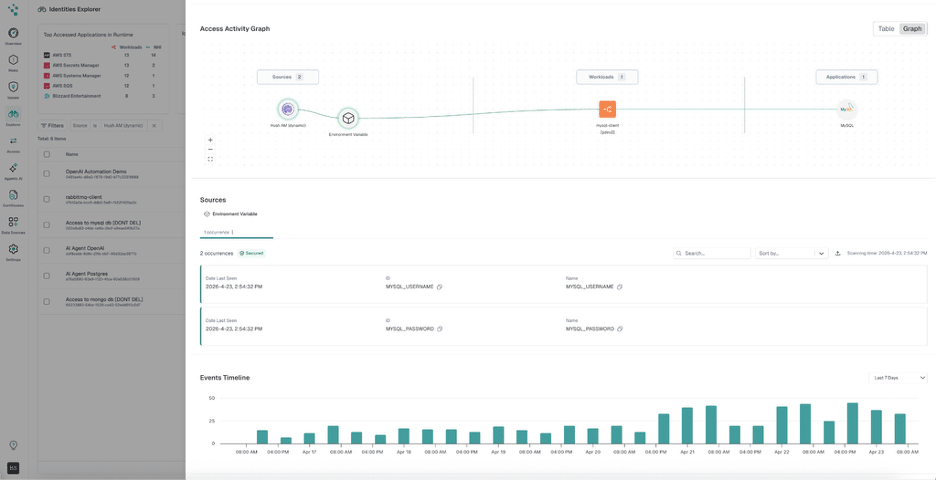
For AI agents: a single Hush call, then on-demand credential requests as the agent works.
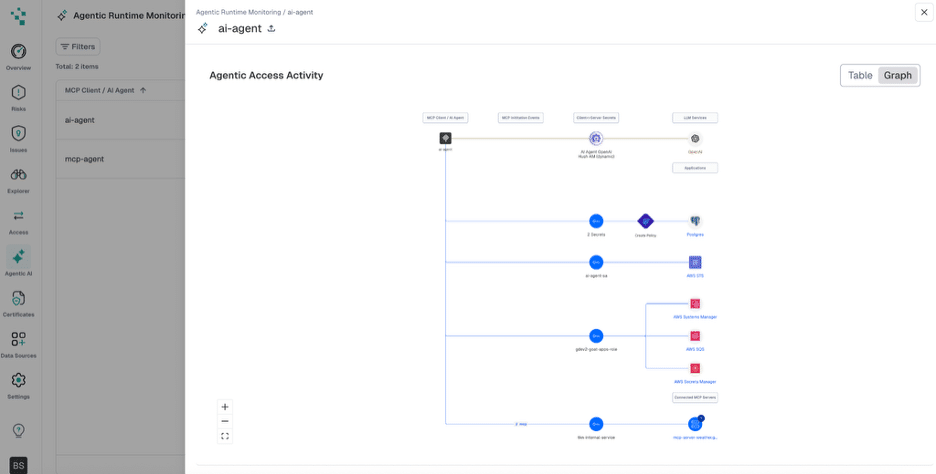
Your team focuses on shipping microservices and building better agents. Not managing credentials.
Getting Started
Pick one critical service or one autonomous agent. Replace its long-lived credentials with Hush-brokered, SPIFFE-attested, short-lived ones. Within weeks, you stop thinking about rotation for that workload. Within months, you wonder why you ever managed credentials any other way.
Start small. Expand as the wins compound. Stop rotating. Stop managing vaults. Stop losing engineering time to credential management.
Ready to Make SPIFFE Work Everywhere?
For platform, SRE, data, and ML engineering teams: See how Hush combines SPIFFE-grade attestation with short-lived, scoped credentials for every resource your workloads already depend on – without changing the resources themselves.