


Agents Should Show Up in Inventories, Not Pentests

Shmulik Ladkani's avatar
Shmulik Ladkani CTO and Co-Founder

Table of Contents

Your AI inventory lists what was declared. The agents and MCP servers running in your clusters show up only in what they do.

The pentest of your production Kubernetes cluster wraps up. The report has one finding in red.

From a foothold in a single pod, the testers reached an MCP server – a small service that hands AI agents tools to call. Nobody had listed it. It answered without asking who was calling. One of its tools ran database queries. Its database credential was production’s.

At the readout, the first question is obvious. What else is out there like it – and who is calling it?

Nobody in the room can say. The AI inventory doesn’t have it. Servers like this rarely get registered. The testers found this one because they walked in.
One server is a finding. Not knowing how many there are is the risk.
Each of them holds whatever credential its team gave it. Each is called by agents that aren’t listed either. And nothing gets cleaned up, because a cleanup needs a list, and there isn’t one.

Agents became ordinary services

Agents used to live in a vendor’s console, or on a developer’s laptop. Now teams ship them the way they ship everything else: as a container in a Deployment, with credentials attached.

That part is old. A service holding credentials is a problem security teams already know.

The new part is that the service chooses its own actions. An agent decides which tool to call, and what to send it.

And tools are easy to add. A team stands up a small MCP server, or adds one more tool to one it already runs. Any agent that can reach the server can then use it.

The wiring is configuration, not deployment. Pointing an agent at a new server is a settings change. Which tools a server offers is whatever it lists when asked. When a server gains a tool, the agent needs no change at all. It finds the new tool the next time it asks.

Every list you have is a list of declarations

  • Agent platform consoles list the agents built on them. They are complete for what they host, and blind to a pod.
  • MCP registries list the servers someone registered. A shadow server is, by definition, not there. OWASP gives it its own entry in the MCP Top 10: MCP09, Shadow MCP Servers.
  • Code and image scanners find an agent framework in sixty images. They read repositories and registries, so they cannot say whether an image is deployed, or where. Nor what it calls, or with which credentials.
  • A network scan finds servers that answer. It cannot say which agents use them.

None of them answers what is running.
Where agents run inside a platform, the platform’s own list is the right source. The gap is the agents and servers you run yourself. What is missing there is observation.

Define an agent by what it does

A workload that speaks MCP and authenticates to a model provider is an agent. It does not need to register. Its traffic says so.

An MCP server is whatever agents call. If it runs in your cluster, it is a workload too, with an image, a service account and credentials of its own.

Both can be observed where they run. Watch what each workload calls, and what it authenticates with, and the pieces connect: the agent, the servers it calls, and the tools it uses.

Which ones matter comes down to what each agent and MCP server can reach. What do its credentials open, and are they long-lived? Does it run in production? Do its calls travel in the clear?

How Hush sees it

The Hush sensor already runs across your clusters, watching how secrets are used. It observes at the operating system level. Applications are not modified, nothing needs an SDK, and no traffic routes through it.

It reads agent traffic too. MCP, and A2A for agent-to-agent calls, are decoded the same way as HTTP or Postgres, including over TLS.

From that traffic, the Hush platform builds the inventory the readout asked for:

  • Agents: workloads that speak MCP or A2A and authenticate to a known model provider.
  • MCP servers: every host an agent calls. In-cluster servers resolve to the workload behind them.
  • Tools: what each server advertises, and what each agent actually calls.
  • Credentials: everything each agent and server authenticated with, traced to its source – the vault entry, the service account, the role.
  • Risk: each agent carries the risk of its credentials: what they can access and how much that matters, whether they belong to production, how long-lived they are, and whether they travel in the clear.

Take the server the testers found. The platform shows every agent calling it, the query tool it offered, and the production credential it held. And every other server like it.

One agent, as the sensor sees it: the model it calls, the MCP servers it uses, and for the in-cluster one, the credential and database behind it.

What changes

  • Inventory. Agents and MCP servers are found by behavior, not by registration.
  • Access. For each agent, the tools it calls and the credentials behind them – including what it reaches through a server.
  • Exposure. MCP and model calls in plaintext or over old TLS.
  • Priority. An agent that reaches a production database outranks one that reaches a test queue.
  • New reach. A server that adds a tool, or an agent that starts calling a new server, shows up from its first call.

The testers found one server because they walked in. The rest should show up in your inventory, not in the next pentest report.

Find Every AI Agent and NHI, Free
Get a Demo

You Found a Leaked Credential. What Breaks If You Revoke It?

Shmulik Ladkani's avatar
Shmulik Ladkani CTO and Co-Founder

Table of Contents

Revoking a leaked credential is the easy part. Knowing what breaks when you do is the part nobody can answer.

A scanner flags a credential in a repository. It’s the data lake key - read access to most of what the company has ever collected.

Nothing reads it from there. It was mistakenly committed two years ago and went unnoticed. But it is out, so it has to be rotated. Nobody argues about that.

Then someone asks which systems are using it.

Nobody can answer. You build a list from memory and from asking around. Twelve services, you think. Four teams.

You rotate on a Tuesday evening and watch. Nothing happens for forty minutes.

Then the reporting view goes blank. For customers.

That team keeps its workload secrets in a different secret manager. You updated the source of truth. You did not update theirs, because yours was never the only one.

Nobody did anything wrong. Two teams standardized at different times. That is how most estates end up.

The next rotation waits for a complete list of consumers. Nobody can produce one. It is still waiting.

The system you’re protecting can’t tell you who’s using it

A safe rotation needs two facts. Which services authenticate with the credential. And where each of them reads it from.

The first sounds like it should come from the data lake. It doesn’t. The lake records that the credential was used. It does not record which service used it. One credential handed to twelve services arrives as one caller, twelve times. The audit trail is fine. It is answering a different question.

The second assumes there is one place the credential is kept. Most estates have several, and one credential can sit in more than one. So a rotation is not one write. It is a write to every place the value is kept, and you have to know how many places that is.

What gets tried first

  • Ask the teams. Tribal knowledge, and the people who set it up have moved on.
  • Last-used data. The best of the existing answers, and still not enough. It tells you the key was used, not which service used it or where it read it from. And only some systems offer it at all.
  • Run two keys and phase it. Genuinely good, where the system supports it. You still need the consumer list to know when the old key has gone quiet.
  • Rotate and see what breaks. This is the one that created the problem.

The answer only exists on one side

Both missing facts are facts about the consumer, not the provider. So any answer has to be built from the authentication itself. Two things follow.

  • It has to work the same for a database password, for a cloud key, and for the API token a SaaS vendor issued you.
  • It cannot carry the secret. What gets recorded has to identify a value without holding it – enough to match two copies of the same value, not enough to reconstruct it.

Get both right and everything you know about one credential collapses into one picture: every place it is kept, and every service observed using it.

The sensor is already watching

Hush deploys a sensor across your clusters and hosts. It observes at the operating system level, so applications are not modified and nothing needs an SDK added to it. It watches; nothing routes through it.

It sees each authentication: which workload made it (a service, a job, a container), what it reached, and where that workload read the credential from an environment variable, a mounted secret, a vault, a cloud secret manager.

The secret value never leaves the machine. Only the fingerprint does.

So the rotation starts with both facts in hand, including the source of truth nobody remembered.

Why runtime matters

A scan can tell you a credential exists somewhere. Almost everything you decide afterwards depends on use.

A match in a repository is a guess. An authentication is proof.

That is why secret-scanning queues fill with findings nobody triages: expired keys, test values, strings that only look like credentials. When the same value turns up authenticating, the guess resolves. When it never does, it can wait.

Use is also what makes a finding rankable. Ranking needs three things: how serious the finding is, how important the system it reaches, and whether the workload using it runs in production. A scan gives you the first, and can often infer the second. But permissions say what a credential could reach. Runtime says what it did reach, and from where.

And what the sensor doesn’t see matters as much as what it does. A credential sitting in a secret manager that nothing has authenticated with is one nobody has needed lately. A credential authenticating from a workload with no secret manager behind it is one nobody owns, and something in production depends on it. Neither of those is visible to anything but a sensor watching the authentications.

What it still won’t tell you

Seeing a credential authenticate is proof it is in use. Not seeing it for thirty days is weaker evidence, because some jobs run once a quarter. An unused credential is a candidate for retirement, not a verdict.

So the output is a list of what breaks, not a promise that nothing will: it covers the workloads on machines the sensor runs on. That is still the difference between planning a rotation and hoping.

The deeper fix is not a better rotation. It is having nothing long-lived to rotate in the first place. Hush Access Manager gets rid of the stored credential. What grants access is a rule about the workload’s identity, the way an IAM role does: the workload gets access because of what it is, not because of what it holds. A short-lived key is minted for it when it runs. The idea is not new. Extending it to a database password and a vendor’s API token is, and that deserves its own post.

Until then, the key still has to be rotated. The difference is that the list already exists, so the rotation stops waiting. Nobody finds out from a customer.

Find Every AI Agent and NHI, Free
Get a Demo

When Your MCP Server Has No Concept of Users

Shmulik Ladkani's avatar
Shmulik Ladkani CTO and Co-Founder

Table of Contents

What to do when the MCP server your workforce depends on has no concept of users.

I’ve run into this more than once. A hundred developers need their agents to reach an MCP server that doesn’t support OAuth. The server authenticates with one service-account key, so the key is handed to all hundred.

Then someone left the company.

Rotating the key locks out that person. It also locks out the other ninety-nine, until each one updates a config file. So the key doesn’t get rotated, and a former employee keeps working access.

That’s the problem. The rest of this is why it shows up now, and what closes it.

Service-account keys are old. Handing one to a hundred people is not.

Before agents, a credential like this went to a handful of integrations built by a platform team. The number of copies tracked the number of integrations.

Now the caller is an agent, and it runs in each developer’s own environment. A credential has to be wherever the agent runs, so the number of copies tracks headcount.

Storage got worse at the same time. A CI secret lives in a secret store. An agent credential lives in a config file on a laptop – synced, screenshared, occasionally committed.

And the credential is now readable by the agent. A prompt injection arriving in a tool result is an adversary who can write text into the process holding the key. CI secrets were never exposed that way.

The admin had two options

  • Distribute the key. The usual outcome. Fast, and unrecoverable. You can’t take it back from a hundred laptops, and you can’t revoke one person.
  • Refuse. Doesn’t stop the work. Developers run the MCP server locally with a key they obtained themselves. One credential the admin knows about becomes an unknown number they don’t.

Notice what isn’t on the list: the option where one person loses access and nobody else notices.

There is a third option

Put something between the agents and the server. Not something you write – a gateway you deploy. Every MCP call, from every agent, goes through one place.

The gateway authenticates the person first. The agent presents a token identifying the user, not the resource.

From there it does what you’d expect. It decides which applications that person may reach and which tools they may call, gates the sensitive ones behind consent, and records every call against a name.

All of that happens before it talks to the resource at all.

For servers that speak OAuth, the loop closes

Each user connects once. The gateway holds their token. Calls carry their identity, and revoking one person is one action that affects one person.

This is why governance for agent access converged on OAuth. The model assumes the resource speaks it.

The assumption fails in two places, for the same reason:

  • SaaS MCP servers that authenticate with a static API key instead of implementing OAuth.
  • Internal MCP servers that bridge to an internal API. Usually worse: the bridge was written for one trusted caller, so its credential tends to be broad – a service account, an admin token, a connection string.

Some SaaS vendors will add OAuth in time. Internal bridges mostly won’t – few teams will build identity-provider integration into something whose job is to wrap an API. Either way, the timeline isn’t yours.

Let the gateway hold the key

Hush Gateway is that third option. Agents connect to it instead of to each server; every call is authorized against the person behind it and recorded under their name.

That holds whether or not the server speaks OAuth. The resource stops dictating your access model.

The gateway verifies a person either way, then presents a credential it holds on their behalf. Where the server speaks OAuth, that is the person’s own access token; where it doesn’t, it is the application’s own credential – a bearer token, a basic pair, or a value in a named header.

The credential is stored as a managed secret, encrypted per deployment, and decrypted only inside the gateway. It never reaches the agent, which carries only its Hush token. Access is decided before the credential is used: a user who isn’t entitled to the application is refused before any upstream request is made.
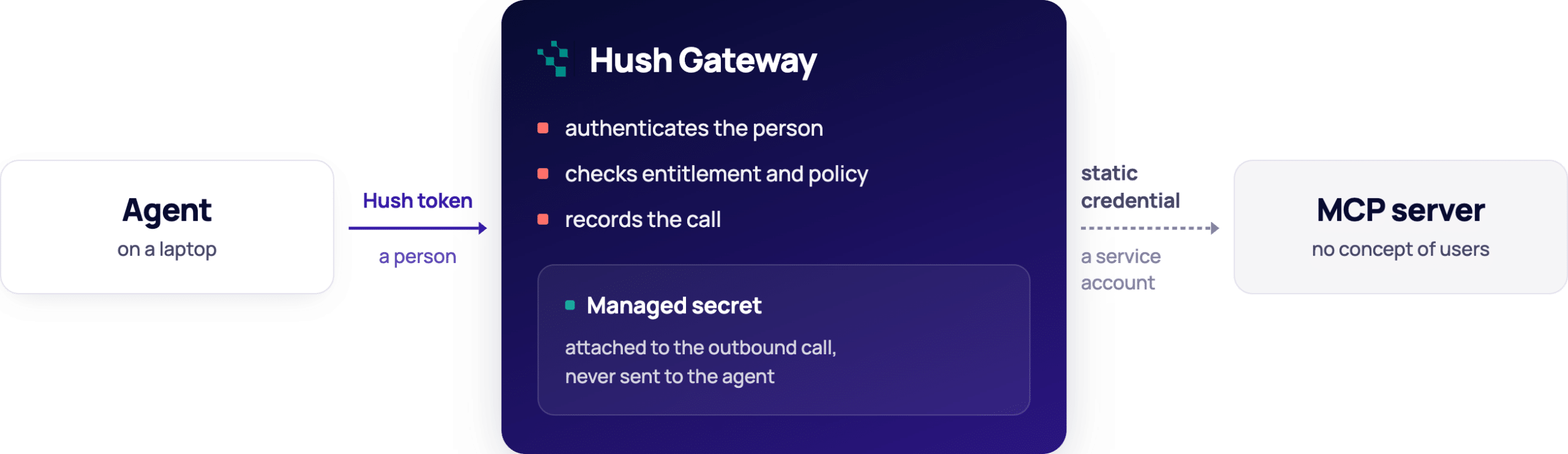
For a server with no OAuth to offer: identity arrives with the call and stops at the gateway. What continues upstream is a credential the resource shares across everyone.

What changes

  • Onboarding. Configure the credential once. Entitled users work immediately.
  • Offboarding. Remove one person’s entitlement. Their access stops. The key is untouched, and the other ninety-nine never notice.
  • Requests. An unentitled user’s agent is told to ask, and can raise an access request for review. No ticket.
  • Audit. Every call is recorded against a person, not a service account.

The credential still has no concept of users. The gateway supplies one.

Where the journey continues

The gateway decides whether a call happens and which tool runs. What a tool reaches once it runs is up to the tool.

The difference shows in the tool surface. A bridge exposing run_query(sql) hands an entitled user everything the service account can read. The gateway can allow that tool or block it, but it cannot tell one query from another.

A bridge exposing get_invoice(id) and list_open_invoices() is governable: allow one, block the other, put consent in front of the ones that write.

Neither gives you per-record authority – that still belongs to the resource. But the tool surface decides how much of the gap the gateway can cover, which is worth knowing before you write an internal bridge. Getting that authority down to the resource itself is the next step, and a harder one.

About Hush Identity Gateway

Hush Gateway is a single control point for everything your agents reach: MCP servers that speak OAuth, servers that don’t, and databases. Adding an application is configuration rather than a project, and enrolling a new agent or person takes minutes. Entitlement, tool policy, consent, guardrails and audit sit in one place and apply the same way to all of them. Available self-hosted or managed.

Find Every AI Agent and NHI, Free
Get a Demo